Upscale a Photo for an A3 Print
A3 is 297 by 420 millimetres. At 300 ppi it wants about 3,508 by 4,961 pixels. That is a real enlargement for a snapshot, and it does not fit in the free download cap.
- No signup for the first three
- Deleted after 24 hours
JPEG, PNG, WebP, or AVIF. No account for the first three repairs.
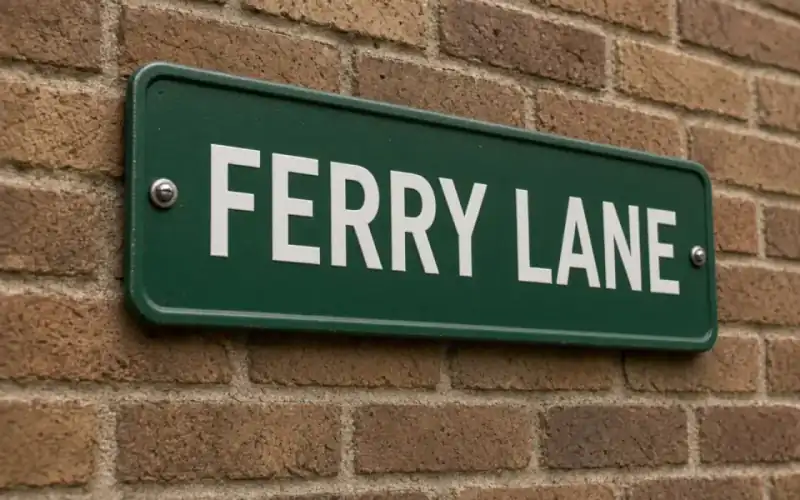
Left: the sign out of focus. Right: the clear photo.
A3
A3 is where 2× often stops being enough
420 mm is about 16.5 inches. Times 300 ppi is about 4,961 pixels. A 2000-pixel phone photo at 2× becomes 4000, still short of that long edge at a strict 300. 4× of a 1500-pixel file clears it and is the Pro mode. 8× is justified only when the input is near a thousand pixels or below and you have already survived a 2× test. Studio is where 8× lives. Pro's input cap is 4,096, so a file that is already 4,000 pixels wide is a Pro upload and probably does not need 4× on top.
Viewing distance saves some A3 prints. A sheet on a wall is not a sheet in a lap. At 150 ppi the long edge wants about 2,480 pixels, which a 2× of a modest file can reach, and which a paid download can keep. The calculator’s limiting-edge readout is the number to quote to yourself. If it says 180, you are in 4× territory or you are accepting a soft sheet.
Bigjpg’s free pixel cap of 3,000×3,000 does not cover a 300 ppi A3 either. Their paid upload limit is 50 MB, and their prices are on the comparison page, dated. Our Studio upload is 40 MB and an 8,192 px long edge. Different products, different stops. Neither one invents a sharp A3 out of a thumbnail.
Proof the sheet, then batch
An A3 mistake is an expensive piece of paper. Run one file through 2×, look at skin and sky, then decide on 4×. Batch twelve only when that sheet is a file you would sign. Face restore at this size is a large likeness. Skip it unless the face has collapsed and you have another photo to check against.
free pages show ads. Unmarked preview. Full download on Pro and Studio. Cancel anytime, no refund of the fee. Failed jobs return the credits. Deletion in 24 hours. Export HEIC before you start, because a refused HEIC is a delay, not a conversion.
A3 is a real enlargement
297 by 420 millimetres wants about 3,508 by 4,961 pixels at 300 ppi. A 2× of a 2,000-pixel phone photo still falls short of the long edge at that standard and may be enough at 150 ppi, which is a wall viewing distance. 4× is the Pro mode when the gap is real. 8× is Studio and a last resort after a 2× test. Do not 4× a file that is already 4,000 pixels unless you want a huge master for its own sake. Pro's input cap is 4,096. The output can be larger than the input.
Bigjpg’s free 3,000 px cap does not cover a 300 ppi A3 either. Their paid uploads go to 50 MB. Ours go to 40 MB on Studio. Different stops, same advice: a thumbnail will not become a sharp sheet. Proof one sheet before a batch. An A3 mistake is a lot of paper and a lot of ink, and the subscription will not refund the taste.
Face restore at this size is a large likeness. Skip it when the face is intact. Use the calculator’s limiting ppi as the number you quote, not a 300 tag you typed into an exporter. The tag does not add pixels. The lab prints the grid. Download the paid file and send your copy. We delete ours after 24 hours.
What to keep beside the slider
A3 at 300 ppi is about 3,508 by 4,961 pixels, from 297 by 420 millimetres. That is where 2× of a normal phone export often stops being enough for a strict standard and may still be enough at 150 ppi on a wall. 4× is Pro. 8× is Studio after a 2× test, not before. Do not enlarge a file that is already past 4,000 pixels out of habit. Pro's input cap is 4,096. The output of a scale can be larger than that cap because the cap is the upload.
An A3 mistake wastes paper. Proof one. Their Business-shaped batches on other sites are not a reason to skip the proof. Bigjpg’s free 3,000 px does not cover this sheet at 300 ppi either. Our free download is 3,200 px, which also stops short of a 300 ppi A3. The paid file is the master you send. Face restore at this size is a billboard of a guess. Skip it when the face is intact. The calculator’s limiting ppi is the number to believe. A 300 tag typed into an exporter does not add the missing samples, and we delete our copy after 24 hours.
The decision you can defend
About 3,508 by 4,961 pixels is the strict A3. 2× of a phone export may be enough at 150 ppi on a wall and short at 300 in the hand. 4× is the Pro jump after a 2× test. Proof one sheet. The limiting ppi in the calculator is the number to believe, not a tag you typed into an exporter.
Three steps on this file
01
Set the preset to A3
297 by 420 mm. Read the limiting ppi of the file you have.
02
Choose 2× or 4× from the gap
2× is the guest test. 4× is Pro. 8× is a last resort on Studio.
03
Keep a paid download
The 3,200 px free file is not an A3 master.
Pixels for this paper
297×420 mm. About 3,508×4,961 pixels at 300 ppi. The calculator uses the size you type. It does not upload a photo.
Settings that matter here
- 150 ppi can be the honest target for a wall.
- 300 ppi is the target for a sheet people will hold.
- Do not 4× a file that is already 4,000 pixels unless you enjoy huge masters.
- The poster preset is the imperial cousin of this problem.
Where this shows up
A single photograph on a large sheet
Measure, test at 2×, print one. Then talk about a batch.
A scan that was interpolated
Rescan at optical resolution. A software 1200 from a 600 sensor is not helping A3.
Limits and formats
JPEG, PNG, WebP, and AVIF decode on the server. HEIC from a phone needs to be exported to JPEG first. The preview is not watermarked. Guest and Free plan downloads are capped at 3,200 px on the long edge. Pro and Studio download the full file. Nothing on this site is an ad.
Guest
- Price
- $0
- Credits
- 3 / day, no account
- Batch
- 1
- Upload
- 6 MB
- Long edge
- 2,000
- Download
- 3,200 px
Free
- Price
- $0
- Credits
- 3 repairs / day
- Batch
- 1
- Upload
- 8 MB
- Long edge
- 2,560
- Download
- 3,200 px
Pro
- Price
- $12/mo
- Credits
- 120 credits / month
- Batch
- 12
- Upload
- 20 MB
- Long edge
- 4,096
- Download
- Full size
Studio
- Price
- $29/mo
- Credits
- 500 credits / month
- Batch
- 40
- Upload
- 40 MB
- Long edge
- 8,192
- Download
- Full size
| Plan | Price | Credits | Batch | Upload | Long edge | Download |
|---|---|---|---|---|---|---|
| Guest | $0 | 3 / day, no account | 1 | 6 MB | 2,000 | 3,200 px |
| Free | $0 | 3 repairs / day | 1 | 8 MB | 2,560 | 3,200 px |
| Pro | $12/mo | 120 credits / month | 12 | 20 MB | 4,096 | Full size |
| Studio | $29/mo | 500 credits / month | 40 | 40 MB | 8,192 | Full size |
Questions worth asking first
How many pixels is A3 at 300 ppi?
About 3,508 by 4,961.
Which plan can download that?
Pro or Studio. Free downloads stop at 3,200 px.
What if the job fails?
The credit is returned. A failed job is not charged. A finished file you dislike does not return the credit or the subscription fee.
Can I cancel?
Yes. Subscriptions cancel anytime and are not refunded. The plan lasts until the period you already paid, then the account returns to Free plan.
How long do you keep the upload?
Uploads and results are deleted 24 hours after the job is created.
Are there ads on this page?
Free pages show ads. Pro and Studio are ad-free. The upload card does not contain an ad.
Related tools
From the guides
Run it on the file you actually have
Three guest repairs a day, no card. If the slider invents a detail you cannot defend, do not download it. Paid plans cancel anytime and are not refunded. A failed job is not charged. The file is deleted after 24 hours.