Unblur Image Online Free: Sharpen Blurry Photos
Unblur is for a photograph that went soft: the camera missed, the bus moved, or someone enlarged a small file until the edges melted. It is not a promise that a completely defocused frame will grow the letters back.
- No signup for the first three
- Deleted after 24 hours
JPEG, PNG, WebP, or AVIF. No account for the first three repairs.
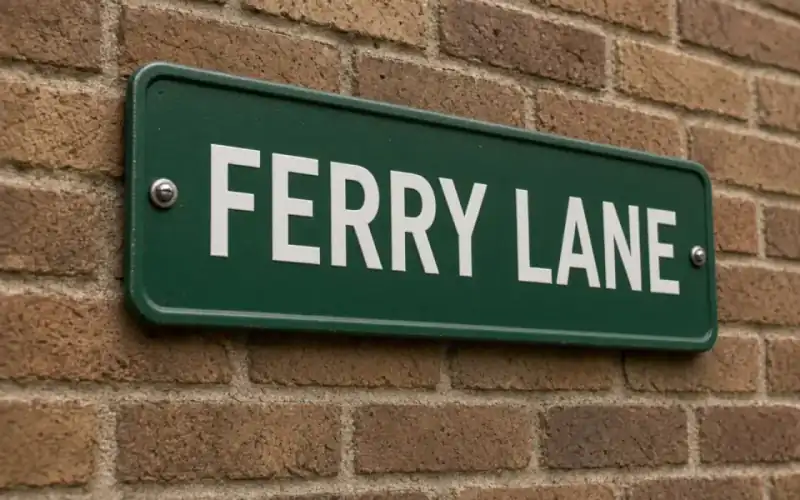
Left: the sign out of focus. Right: the clear photo.
Unblur
What kind of blur you actually have
Motion blur drags a highlight into a streak. Missed autofocus puts a halo around contrast and leaves the subject as a soft mass. A resized JPEG looks soft because the samples were averaged, not because the lens moved. Those three want different patience. A streak with a known direction can sometimes be reasoned about. A subject that was never in the plane of focus often cannot.
Use letters as the test when you have them. A sign, a jersey, a book spine. Type what you believe the word says before you run the model, then see whether the repair agrees. A face can look plausibly sharp and be a slightly different face. A letter is either the letter or it is not.
Classical sharpening draws a dark line beside a light line. On a blurry photo that line becomes a halo, and the word is still wrong. The unblur mode is a prediction of a sharper frame, which is why you have to look.
How the free pass behaves
Unblur is available without an account, inside the three guest repairs a day, alongside 2× and denoise. The preview is full quality. There is no watermark on it. Ads stay off the tool card. Free pages show ads. The download you can take away on the free plans is capped at 3,200 px on the long edge.
If the letters split into parallel copies, the model guessed a blur length the file did not have. Keep the original. If the job itself errors, the credit comes back. Cancelling a subscription is separate: you can cancel anytime, and the charge is not refunded.
Face-specific mush is a different mode. Face restore is on Pro and Studio because it is willing to rebuild eyes. Use it only when the face is the subject, and read that page before you spend the credits.
Name the blur before you ask a model to undo it
Motion blur is a streak. The direction is visible in a highlight, a letter, a branch. Missed autofocus is a haze with no direction, often with one plane almost sharp and the subject soft. A heavy resize is a third softness, the kind a phone applies when it fits a photo into a story and then you save the story. These want different patience. A directional streak that is longer than the subject’s detail will not come back as type you can read. A mild focus miss on a still object often will. The slider is how you tell them apart, because a single after image hides the invention.
Halos are the failure you should hunt for. Around a window, a collar, a dark tree against a bright sky, a hungry sharpen draws a light line and a dark line that were not in the room. If you see that pair, the pass is too strong for the file even if the eyes look crisper. Leave it. Do not stack a second unblur on the result. You will pay to amplify the halo. One credit covers the mode. The credit returns only when the job fails, not when the halo is ugly.
Unblur is one of the three guest repairs, with 2× and denoise. No account, no watermark on the preview. The free download is capped at 3,200 px on the long edge, which is a judgment file, not the file you send a magazine. If the letters of a sign stay split into parallel copies, the model guessed a blur length the photograph did not have. Keep the camera original. Our copy of either file is deleted after 24 hours.
A last look at the halo
Hunt the boundary between a dark shape and a bright one. A window, a collar, a tree against sky. Two parallel lines, one light and one dark, mean the unblur invented an edge. One line that was already there, now easier to see, is the result you can defend. Do not run the mode again on its own output. You will pay to deepen the halo.
What to keep beside the slider
Name the blur in a sentence before you run it. “The sign streaked left.” “The face missed focus and the wall did not.” “A story resize softened everything.” The first may be unrecoverable if the streak is longer than the letter. The second is the mode’s best case. The third is often a 2× problem instead, and unblur will draw halos around type that was only small. One guest credit tells you which sentence was true. A second unblur on the result is how a mild halo becomes a double edge you cannot explain to the person in the picture.
Three steps on this file
01
Name the blur
Streak, missed focus, or a file that was enlarged. Write down any letters you can already read.
02
Run unblur and check those letters
Drag the slider across the word. A crisp wrong letter is a failure even if the picture looks sharp.
03
Stop or go larger
If the subject holds, a later 2× can give you size. Do not stack passes until the first one is honest.
Settings that matter here
- A completely blank defocus will not grow a face. The model needs structure.
- Halos around window frames mean the pass was too hungry. Keep the softer file.
- Phone motion at night is often noise plus blur. Denoise after you see whether the unblur helped, not before, so you can tell them apart.
- Download before 24 hours. The deletion is automatic.
Where this shows up
A sign shot from a moving bus
The letters smeared sideways. They are the answer key. If the repair changes FERRY into a different word, it failed.
A portrait where the eye is almost sharp
There is still an edge. Unblur can pull it forward. If the eye was a smooth disc, it will invent an eye.
Limits and formats
JPEG, PNG, WebP, and AVIF decode on the server. HEIC from a phone needs to be exported to JPEG first. The preview is not watermarked. Guest and Free plan downloads are capped at 3,200 px on the long edge. Pro and Studio download the full file. Nothing on this site is an ad.
Guest
- Price
- $0
- Credits
- 3 / day, no account
- Batch
- 1
- Upload
- 6 MB
- Long edge
- 2,000
- Download
- 3,200 px
Free
- Price
- $0
- Credits
- 3 repairs / day
- Batch
- 1
- Upload
- 8 MB
- Long edge
- 2,560
- Download
- 3,200 px
Pro
- Price
- $12/mo
- Credits
- 120 credits / month
- Batch
- 12
- Upload
- 20 MB
- Long edge
- 4,096
- Download
- Full size
Studio
- Price
- $29/mo
- Credits
- 500 credits / month
- Batch
- 40
- Upload
- 40 MB
- Long edge
- 8,192
- Download
- Full size
| Plan | Price | Credits | Batch | Upload | Long edge | Download |
|---|---|---|---|---|---|---|
| Guest | $0 | 3 / day, no account | 1 | 6 MB | 2,000 | 3,200 px |
| Free | $0 | 3 repairs / day | 1 | 8 MB | 2,560 | 3,200 px |
| Pro | $12/mo | 120 credits / month | 12 | 20 MB | 4,096 | Full size |
| Studio | $29/mo | 500 credits / month | 40 | 40 MB | 8,192 | Full size |
Questions worth asking first
Can every blurry photo be unblurred?
No. If the subject was never recorded, there is nothing to sharpen. Mild softness and small enlargements are the honest cases.
Is this free?
The free tool includes unblur, three repairs a day, no account.
Will you watermark the preview?
No. The size cap is on the free download, not on the preview.
Does a failed attempt cost a credit?
No. Failures are returned. A successful file you regret is charged.
Can I cancel later?
Yes. Subscriptions cancel anytime and are not refunded.
How is this different from face restore?
Unblur treats the whole frame. Face restore rebuilds facial features and can drift identity. It is a paid mode.
Related tools
Run it on the file you actually have
Three guest repairs a day, no card. If the slider invents a detail you cannot defend, do not download it. Paid plans cancel anytime and are not refunded. A failed job is not charged. The file is deleted after 24 hours.