Make Blurry Screenshots Sharp
A screenshot is already pixels. Enlarging it repeats them. If the screenshot is of a photograph, a product, or a face, an upscaler can guess a continuous image underneath. If it is of type, a button, or a spreadsheet, the model will try to turn the letters into texture. Do not ask it to.
- No signup for the first three
- Deleted after 24 hours
JPEG, PNG, WebP, or AVIF. No account for the first three repairs.
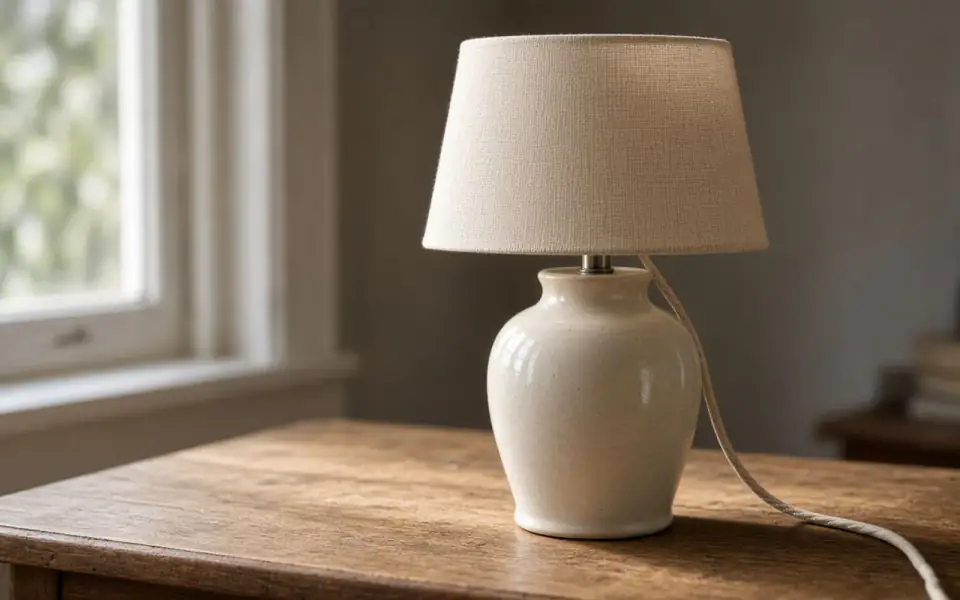
Left: the lamp broken into blocks. Right: the clear photo.
Screenshot
Two kinds of screenshot
The first is a capture of a photo that was displayed too small: a listing, a chat image, a scan someone photographed off a monitor. The stair-steps are the display. 2× can rebuild a plausible object. Check any text in the photo, because text is where invention shows.
The second is the interface itself. Menus, code, a banking screen, a meme with a caption. Those edges are supposed to be hard. A photographic model softens them into organic shapes. Re-export from the source, or redraw the type. This tool will not become a vector tracer.
PNG is the right container for a screenshot because it does not add JPEG blocks on top of the pixel grid. If the screenshot was re-saved as a low-quality JPEG, you have both problems. The PNG page covers the container. This page covers the content.
A small, free test
Paste the screenshot straight into the tool. Guest mode allows three repairs a day without an account. Run 2×. Zoom the slider on the one edge you care about, not on a flattering region. If a logo’s letter changed, the repair failed even if the photo area looks richer.
There is no watermark on that preview. Ads stay off the tool card. Free pages show ads. The free download is capped at 3,200 px, which for a screenshot is often the point: a capture you can drop into a document without shipping a huge invented file. Paid plans keep the full upscale and can batch a set of captures.
Do not upload a screenshot that contains someone else’s private data you do not have a reason to process. We delete it after 24 hours, and you should not have sent it.
Screenshots contain type, and type is a bad thing to invent
A screenshot is a grid of device pixels. Enlarging it with a photo model asks the model to treat letters as foliage or skin. Sometimes the strokes get cleaner. Often a glyph changes weight or a digit becomes a neighbor. If the words matter, retype them or export the original screen at the size you need. Use the tool on the photograph inside the screenshot, cropped away from the UI, or on a product shot where a soft edge is the defect and the words are elsewhere.
PNG is the right container for a UI capture because it does not add JPEG blocks on top of the pixel grid. If the screenshot was already saved as a low-quality JPEG, you have two problems, and the pixelation page is the companion to this one. WebP and AVIF also decode here. A phone screenshot in HEIC needs to be exported first. We do not decode HEIC, and we do not decode TIFF.
The free download cap is often the right size for a screenshot you are dropping into a document. 3,200 px on the long edge, no watermark. Free pages show ads. Paid plans keep a larger upscale and can batch a set of captures, twelve or forty. Do not upload a capture of someone else’s private data without a reason to process it. We delete it after 24 hours, and that deletion is not a substitute for not sending it. A failed job is not charged.
A last look at the glyphs
Read every digit in the repaired crop. A 3 that became an 8 is a successful-looking failure, and it will be believed because it is type. If the words matter, retype them. If the photograph inside the screenshot is the subject, crop the chrome away and upscale that rectangle. PNG keeps the hard edges better than a second JPEG. The free download cap is often the right size for a document and the wrong size for a poster of the same capture.
What to keep beside the slider
Device pixels are a grid that a photo model wants to turn into foliage or skin. Sometimes a stroke gets cleaner. Often a digit changes. If the screenshot is evidence, re-export the screen or retype the words. If a product photo is trapped inside the capture, crop to it and upscale that. PNG avoids a second generation of JPEG blocks. The free cap of 3,200 px is frequently the right delivery for a document. Paid plans keep a larger file and can batch captures, twelve or forty, after one of them has been read digit by digit. Do not upload someone else’s private screen on the theory that we delete it tomorrow. Deletion is not permission.
The decision you can defend
Read the digits after the repair. A changed number is a failure that looks like success. Crop to the photograph when the words are not the subject, and retype the words when they are. The free cap is often the right size for a document. It is the wrong size for a poster of the same capture.
Three steps on this file
01
Ask whether the subject is a photograph
If it is UI or body text, stop. If it is a picture of a thing, continue.
02
Paste and run 2×
PNG or JPEG. The tool accepts a paste.
03
Read every character in the frame
A changed letter means you keep the small screenshot.
Settings that matter here
- Crop away the browser chrome so the model spends its time on the picture.
- A photo of a screen, taken with a camera, has moiré. That is not pixelation and often looks worse after an upscale.
- 4× on a screenshot of a screenshot is how you get felt instead of a product.
- Deletion is 24 hours. Do not use the tool as a clipboard history.
Where this shows up
A product photo saved out of a chat
The sender’s app crushed it. 2× can make it usable in a layout. It will not become the vendor’s master file.
A slide grabbed from a recording
If the slide is type, stop. If the slide is a photograph with a caption, crop to the photograph.
Limits and formats
JPEG, PNG, WebP, and AVIF decode on the server. HEIC from a phone needs to be exported to JPEG first. The preview is not watermarked. Guest and Free plan downloads are capped at 3,200 px on the long edge. Pro and Studio download the full file. Nothing on this site is an ad.
Guest
- Price
- $0
- Credits
- 3 / day, no account
- Batch
- 1
- Upload
- 6 MB
- Long edge
- 2,000
- Download
- 3,200 px
Free
- Price
- $0
- Credits
- 3 repairs / day
- Batch
- 1
- Upload
- 8 MB
- Long edge
- 2,560
- Download
- 3,200 px
Pro
- Price
- $12/mo
- Credits
- 120 credits / month
- Batch
- 12
- Upload
- 20 MB
- Long edge
- 4,096
- Download
- Full size
Studio
- Price
- $29/mo
- Credits
- 500 credits / month
- Batch
- 40
- Upload
- 40 MB
- Long edge
- 8,192
- Download
- Full size
| Plan | Price | Credits | Batch | Upload | Long edge | Download |
|---|---|---|---|---|---|---|
| Guest | $0 | 3 / day, no account | 1 | 6 MB | 2,000 | 3,200 px |
| Free | $0 | 3 repairs / day | 1 | 8 MB | 2,560 | 3,200 px |
| Pro | $12/mo | 120 credits / month | 12 | 20 MB | 4,096 | Full size |
| Studio | $29/mo | 500 credits / month | 40 | 40 MB | 8,192 | Full size |
Questions worth asking first
Can you make text in a screenshot sharp?
Usually no, and you should not want the model to redraw words. Re-export the text.
Can I paste instead of uploading?
Yes. The tool listens for an image on the clipboard.
Is it free?
2× is part of the three guest repairs a day.
Will there be a watermark?
Not on the preview. The free download is size-capped.
Are screenshots used to train anything?
No. They are deleted after 24 hours and are not a training set.
What if the job errors?
The credit is returned.
From the guides
Run it on the file you actually have
Three guest repairs a day, no card. If the slider invents a detail you cannot defend, do not download it. Paid plans cancel anytime and are not refunded. A failed job is not charged. The file is deleted after 24 hours.