AI Photo Denoiser: Remove Noise Without Losing Detail
Denoise is the mode for speckle that was never a choice. It is not a skin smoother and it is not an upscaler. Run it when the veil is the problem, and stop when the edges you care about start to dissolve.
- No signup for the first three
- Deleted after 24 hours
JPEG, PNG, WebP, or AVIF. No account for the first three repairs.
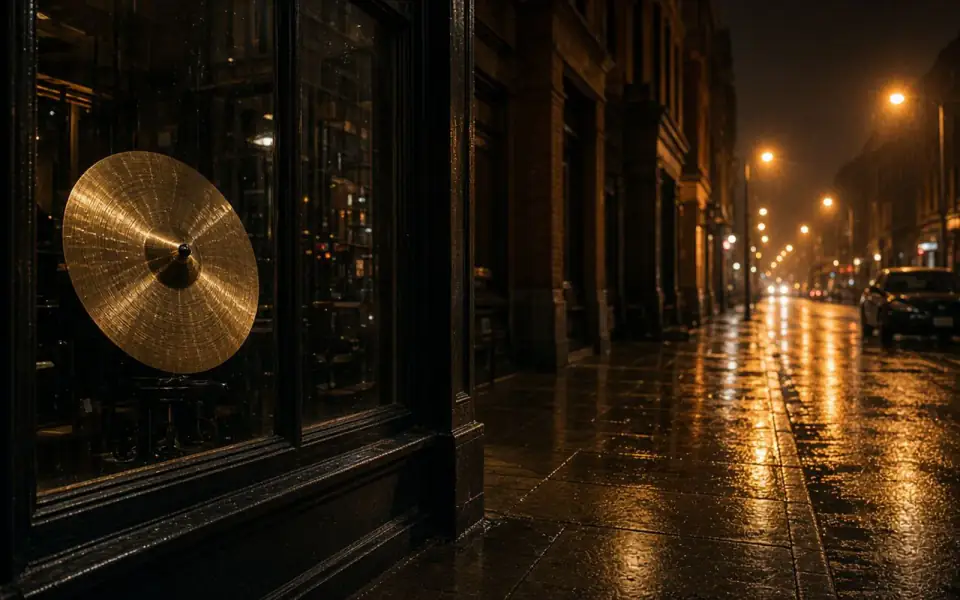
Left: coarse grain over the street. Right: the cleaner photo.
Denoise
Noise has a cause you can name
A small sensor in a dark room raises its gain, and the gain has a color. That is the purple shadow speckle in a phone photo. A flatbed scanner has its own fine grain, plus dust that is actually on the glass. Film grain is a third thing, chemical and shaped by exposure. Only the first two are mistakes.
If you denoise film grain you are choosing a different picture. Say so. The slider makes the choice visible: the before side is the grain you had, the after side is the surface the model prefers. There is no hidden “after only” view.
JPEG blocks plus noise should be denoised before any sharpen. Sharpening the blocks first draws a grid.
What the credit buys
Denoise costs one credit and is on the free tool. Three a day, no signup, no watermark on the preview. The free download is 3,200 px on the long edge. If you need the full denoised file for a printer, that is Pro or Studio, which also batch.
Stacking is optional and ordered. Denoise, look, then 2× if the cleaned file is too small. Do not denoise the upscale. You would be cleaning texture the upscaler just invented.
A provider timeout or a decode error returns the credit. The photo is deleted after 24 hours whether you liked it or not.
How to tell a finished denoise from a wax cast
Pick three patches and ignore the rest of the frame until they are honest. A flat wall or sky should lose the colored speckle and keep a little life, not become a single poster color. A hairline or a fabric weave should still break the surface. A catchlight in an eye should stay a small shape, not a painted dot. If the wall is perfect and the hair is gone, you have the common failure. Download nothing. The original is the better file, and the credit for a completed job stays spent.
JPEG adds square blotches that look like noise and are not. Denoise can soften them and can also smear the edge of the block into a new pattern. If the squares are the dominant defect, read the pixelation page before you run this one. If both are present, denoise and then look again before any upscale. Upscaling first is how a blotch becomes a feature. The modes are separate so you can see which one moved the pixels.
Denoise is one credit and it is on the free tool, three times a day, no account required. The preview is full quality. The free download is 3,200 px on the long edge. Pro and Studio download the full denoised file and can batch a card of night frames. Ads stay off the slider. Uploads and results are deleted after 24 hours. If the provider errors, the credit comes back. If you simply wanted a heavier hand, run a second job rather than asking a refund of a result that succeeded.
A last look at hair and sky
Hair should still break the outline. Sky should lose the magenta specks and keep a little drift. If you can only have one of those, keep the hair and accept a slightly busier sky. A poster sky with plastic hair is the failure mode of every heavy denoise, and it is obvious at 100 percent even when the fit-to-screen view looks clean. One credit, then a decision. A second pass is a new job, not a refund of the first.
What to keep beside the slider
Order the pass and then stop touching it. Denoise, look at skin and a flat wall, then upscale only the cleaned file if the count is short. Upscaling first prints the speckle at the new size and makes the denoise work harder for a worse picture. JPEG blocks that look like noise are a different page. Film grain you like is a reason to close the tab. The mode is one credit, on the free tool, with an unmarked preview and a free download at 3,200 px. A printer that needs the full denoised frame is Pro or Studio. Ads stay off the slider.
The decision you can defend
If you only remember one control, remember the flat wall. Speckle leaves. A little life stays. Hair still breaks the outline. That is a finished denoise. A poster wall and plastic hair is a spent credit and a file you should not print. One guest repair is enough to see the difference, with ads off the tool and no watermark between you and the original.
Three steps on this file
01
Name the noise
High ISO, scanner dust, or film grain you might want to keep.
02
Run denoise and check a flat area and an edge
Sky should not posterize. A brick edge should not move.
03
Enlarge only after
2× the cleaned file if you need size. Leave film grain alone if it was the point.
Settings that matter here
- One pass. A second denoise usually melts the file.
- Crop to the noisy region if the rest of the frame is clean, so you can see the damage.
- Batch night sets on Pro or Studio, not one by one on the guest cap.
- The mock provider, when configured, is a local preview and is labeled as such.
Where this shows up
Indoor sports under bad lights
The ISO is the story of the noise. Denoise can make the jersey readable. It will not invent a sharper ball if the ball was a streak.
A scanned slide
Dust and a fine scanner mist. Denoise, then look at the grain of the film underneath before you decide it was noise too.
Limits and formats
JPEG, PNG, WebP, and AVIF decode on the server. HEIC from a phone needs to be exported to JPEG first. The preview is not watermarked. Guest and Free plan downloads are capped at 3,200 px on the long edge. Pro and Studio download the full file. Nothing on this site is an ad.
Guest
- Price
- $0
- Credits
- 3 / day, no account
- Batch
- 1
- Upload
- 6 MB
- Long edge
- 2,000
- Download
- 3,200 px
Free
- Price
- $0
- Credits
- 3 repairs / day
- Batch
- 1
- Upload
- 8 MB
- Long edge
- 2,560
- Download
- 3,200 px
Pro
- Price
- $12/mo
- Credits
- 120 credits / month
- Batch
- 12
- Upload
- 20 MB
- Long edge
- 4,096
- Download
- Full size
Studio
- Price
- $29/mo
- Credits
- 500 credits / month
- Batch
- 40
- Upload
- 40 MB
- Long edge
- 8,192
- Download
- Full size
| Plan | Price | Credits | Batch | Upload | Long edge | Download |
|---|---|---|---|---|---|---|
| Guest | $0 | 3 / day, no account | 1 | 6 MB | 2,000 | 3,200 px |
| Free | $0 | 3 repairs / day | 1 | 8 MB | 2,560 | 3,200 px |
| Pro | $12/mo | 120 credits / month | 12 | 20 MB | 4,096 | Full size |
| Studio | $29/mo | 500 credits / month | 40 | 40 MB | 8,192 | Full size |
Questions worth asking first
Is denoise the same as unblur?
No. Denoise lifts speckle. Unblur addresses softness. They are separate modes so you can see which one moved.
Will detail survive?
Some fine texture will go. That is the trade. The slider is how you price it.
Can I try it without an account?
Yes. It is one of the three guest repairs a day.
Are there ads?
Free pages show ads. Pro and Studio are ad-free. The upload card does not contain an ad.
What is the free download size?
3,200 px on the long edge. The preview is full quality.
Do you charge if the model fails?
No.
Related tools
From the guides
Run it on the file you actually have
Three guest repairs a day, no card. If the slider invents a detail you cannot defend, do not download it. Paid plans cancel anytime and are not refunded. A failed job is not charged. The file is deleted after 24 hours.