Fix an Out-of-Focus Photo Without Sharpening the Bokeh
Missed autofocus is a soft disk on the subject. Depth of field is a soft background you chose. Only the first one is a candidate for unblur.
- No signup for the first three
- Deleted after 24 hours
JPEG, PNG, WebP, or AVIF. No account for the first three repairs.
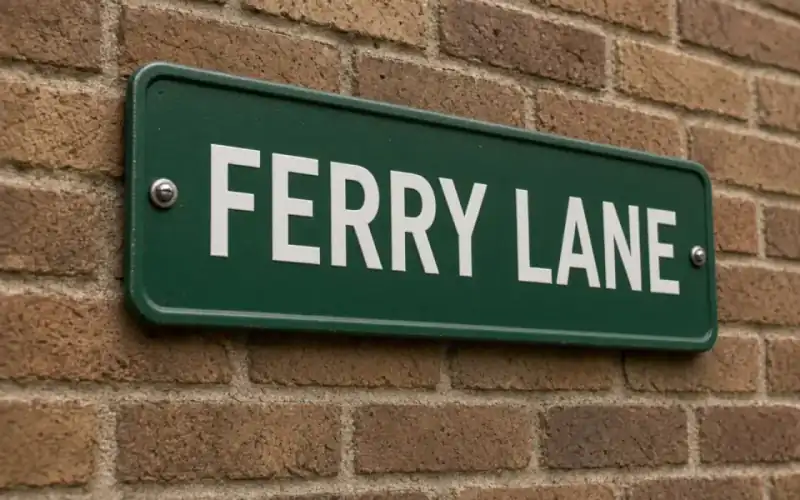
Left: the sign out of focus. Right: the clear photo.
Out of focus
A disk is not a streak
Look at a highlight. If it is a disk or a polygon from the aperture, the blur has no direction. That is focus. If it is a dash, that is motion, and the motion page is the one to read. Unblur on a directional smear often makes a double edge. Unblur on a mildly soft subject can pull the existing edges forward. A subject that was never in the plane of focus, by a lot, will not become the sharp photograph you wish you had taken.
Background bokeh is information. A portrait with a soft garden should keep the garden soft. If the model hardens leaves behind the person, it has misunderstood the lens. Reject that file even if the eye looks better. The eye can be judged on its own crop. The garden tells you whether the model respected the focus plane.
A completely missed shot, where the subject is a woolly shape and the background is what the camera locked onto, has very little subject left to recover. 4× and 8× make a larger woolly shape. Face restore, if the woolly shape is a head, will invent a person. Read the portrait page before you spend those credits, and keep a second photograph nearby.
One pass, then a decision
Unblur is one credit on the free tool. There is no focus-distance slider and no aperture control. The comparison is the control. If the result is too crisp, or if it haloed a contrast edge, keep the original. A second unblur pass usually embosses skin. Sharpening on top of that outlines the embossing. Stop at one.
Denoise only if the soft file is also speckled. Out-of-focus is not noise, and denoise will not pull a plane of focus back. Order, if you need both, is denoise, look, then unblur. Upscale last, and only if the calculator says you are short of pixels. A soft 4,000 px file does not need 2×. It needs a decision about focus.
Phone portrait mode is often a mask plus a blur, not optical bokeh. A hard halo around hair is the mask. Unblur will not negotiate with it. If the cutout is the defect, reshoot or accept it. Do not describe a mask as missed focus.
Size, rights, and the clock
The free download of 3,200 px is enough to judge the repair and enough for an 8×10 at 300 ppi. It is not a reason to enlarge a file you have not accepted. Pro and Studio keep a larger result. Commercial use is allowed on every plan when you have the rights. Free pages show ads and no watermark.
A failed job returns the credit. A successful sharpen of the wrong plane does not. Subscriptions cancel anytime and are not refunded. Uploads and results are deleted after 24 hours. Download the frame you trust. HEIC must be exported first. The API runs the same unblur and will not add a focus slider either.
If you are choosing between this page and the sharpen page: sharpening is what people call the halo filter, and unblur is the mode we actually run. Both pages end at the same tool. The difference is the warning. Here the warning is bokeh. There the warning is a white fringe.
A worked frame
A portrait at 2000 px has a soft face and a garden that was meant to be disks of light. Unblur once and crop your judgment in two places. The eye should gain an edge without a new smile. The garden should stay disks. If the leaves become twigs, the model ignored the focus plane and the file is a rejection even though the eye improved. Do not denoise the garden to ‘help.’ Do not 2× until the plane is accepted. 2000 px already fits an 8×10 inside the spirit of the 3200 px cap, and 2× would be 4000, trimmed to 3200 on the free download, which is a size change rather than a focus change. Portrait mode on a phone that cut the hair out with a hard halo is not this defect. The halo is a mask. Reshoot or accept it. Face restore is the wrong rescue for a focus miss that still has a face, and it is unavailable to a guest anyway. One credit, one look, keep the camera original if the garden went sharp. A paid 4× of that same miss would only make the twigs larger and would not move the focus plane back onto the face. Reshoot if the eyes are empty. The model cannot move the plane of focus.
Three steps on this file
01
Check a highlight
A disk is focus. A dash is motion. A hard hair halo is a mask.
02
Unblur the subject once
Leave the background soft. Reject a garden that turned to twigs.
03
Do not enlarge a miss
If the subject is still wool, a larger file will not focus it.
Settings that matter here
- Depth of field is not a defect.
- A second pass embosses skin.
- Portrait-mode cutouts are masks.
- Prove the eye and the background separately.
Where this shows up
A missed autofocus on a face
The features are soft in every direction and still recognizable. Unblur is the test.
A macro that focused on the wrong stamen
The plane is simply elsewhere. Reshoot if the subject is empty. Do not 8× the blur.
Limits and formats
JPEG, PNG, WebP, and AVIF decode on the server. HEIC from a phone needs to be exported to JPEG first. The preview is not watermarked. Guest and Free plan downloads are capped at 3,200 px on the long edge. Pro and Studio download the full file. Nothing on this site is an ad.
Guest
- Price
- $0
- Credits
- 3 / day, no account
- Batch
- 1
- Upload
- 6 MB
- Long edge
- 2,000
- Download
- 3,200 px
Free
- Price
- $0
- Credits
- 3 repairs / day
- Batch
- 1
- Upload
- 8 MB
- Long edge
- 2,560
- Download
- 3,200 px
Pro
- Price
- $12/mo
- Credits
- 120 credits / month
- Batch
- 12
- Upload
- 20 MB
- Long edge
- 4,096
- Download
- Full size
Studio
- Price
- $29/mo
- Credits
- 500 credits / month
- Batch
- 40
- Upload
- 40 MB
- Long edge
- 8,192
- Download
- Full size
| Plan | Price | Credits | Batch | Upload | Long edge | Download |
|---|---|---|---|---|---|---|
| Guest | $0 | 3 / day, no account | 1 | 6 MB | 2,000 | 3,200 px |
| Free | $0 | 3 repairs / day | 1 | 8 MB | 2,560 | 3,200 px |
| Pro | $12/mo | 120 credits / month | 12 | 20 MB | 4,096 | Full size |
| Studio | $29/mo | 500 credits / month | 40 | 40 MB | 8,192 | Full size |
Questions worth asking first
Can I try this without an account?
Yes. Guests get 3 credits a day. 2×, denoise, and unblur cost one. Colorize costs two. 4× and face restore start on Pro. 8× is Studio.
Can you change the depth of field?
No. We can try to clarify a soft subject. We should not harden a background you blurred on purpose.
Is the preview watermarked?
No. Guest and Free plan downloads are capped at 3,200 px on the long edge. Pro and Studio download the full file.
What if the job fails?
The credit is returned. A failed job is not charged. A finished file you dislike does not return the credit or the subscription fee.
How long do you keep the upload?
Uploads and results are deleted 24 hours after the job is created.
Can I use the result commercially?
Yes, on every plan, including the free tool, when you have the rights to process the file.
Related tools
Run it on the file you actually have
Three guest repairs a day, no card. If the slider invents a detail you cannot defend, do not download it. Paid plans cancel anytime and are not refunded. A failed job is not charged. The file is deleted after 24 hours.