Enhance a Night Photo Without Sanding the Lights
Night photographs are noisy because the sensor raised its gain. The noise has a color. The lights may also be streaks. Those are two repairs, and the order matters.
- No signup for the first three
- Deleted after 24 hours
JPEG, PNG, WebP, or AVIF. No account for the first three repairs.
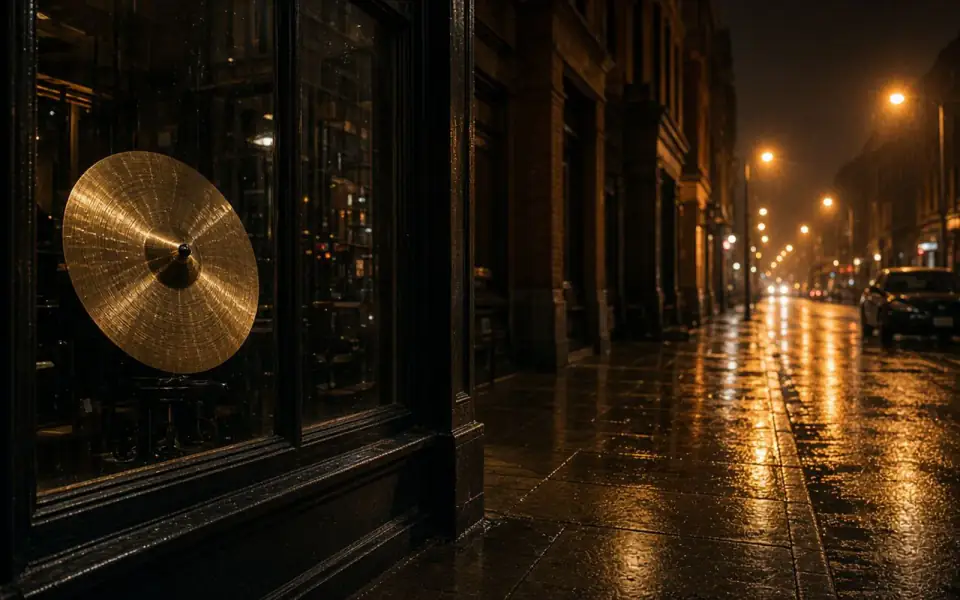
Left: coarse grain over the street. Right: the cleaner photo.
Night photo
Name the speckle before you name the blur
A small sensor in a dark room writes purple and green speckle in the shadows. That is denoise, one credit, on the free tool. Look at a flat wall or a night sky and at a hair or a brick edge. The wall should lose the colored dots and keep a little life. The hair should still break the outline. If the wall becomes one poster color and the hair disappears, you have the common failure. Keep the noisy file.
Headlights, street lamps, and neon that became dashes are motion blur from the exposure or from camera shake. Denoise will not turn a dash into a disk. Read the motion page if the dash is the complaint. Unblur on a long streak often adds a ghost. The grain and the streak can both be present. Denoise first so you can see the streak, then decide whether the streak is short enough to touch.
Film grain at night is a third thing, chemical and sometimes the reason the picture exists. Denoising it chooses a different picture. Say so. The slider makes the choice visible. There is no hidden after-only view and no amount slider. One pass.
Do not upscale the noise
A 2× enlarge of a noisy frame prints the speckle at the new size and makes the later denoise work harder for a worse picture. Clean, look, then enlarge only if the count is short. A phone night mode has already made an opinion. A hard halo around a person is a mask, and neither denoise nor unblur will negotiate with a bad cutout. Reshoot or crop.
Color in the shadows is partly the gain and partly the lamp. Denoise can calm the chroma noise and can also pull a tungsten room toward a flatter hue. If the color of the room was the memory, compare a curtain and a skin tone before you accept the quieter file. Colorize is the wrong mode. The frame already has color. Colorize is for a black-and-white scan.
JPEG blocks in a dark sky look like noise and are not. If the squares dominate, read the artifact page. Sharpening the blocks first draws a grid the denoise then has to sand. Bring the earliest file. A chat app’s recompress is often the whole problem.
What you can keep
The free download stops at 3,200 px. A denoised night frame under that size downloads whole on Free plan. A print larger than an 8×10 at 300 ppi needs Pro or Studio. Batch a card of night frames only after one of them has an honest wall and an honest edge. Twelve is Pro. Forty is Studio. Guests run one file at a time.
Commercial use is allowed on every plan when you have the rights. Free pages show ads. Uploads and results are deleted after 24 hours, so a night set is not stored here for a later edit. Download the keeper. A failed job returns the credit. A heavier denoise you wish you had not run does not.
The mock provider is a local preview and is labeled. A Replicate token runs the denoise model, defaulting to Swin2SR unless REPLICATE_MODEL_DENOISE says otherwise. The API uses the same mode name, denoise, and the same deletion clock.
A worked frame
A phone alley is 2000 px on the long edge, the subject is acceptably sharp, and the shadows are purple speckle. Denoise once. A flat door should lose the magenta dots and keep a little tone. A hair against a lamp should still break the outline. If the door becomes one brown rectangle and the hair vanishes, keep the noisy file. The lamps in this particular frame are disks, not dashes, so the motion page does not apply. Do not 2× until the denoise has been accepted, or you will enlarge the speckle and then pay to sand it. 2000 px is already enough for a feed and, at 2× after a good denoise, becomes 4000, which the free download trims to 3200. That trim is fine for an 8×10 and not a reason to jump to Studio. Leave film grain alone if this had been a pushed negative instead of a phone. Colorize is the wrong mode because the alley already has color. Export HEIC before you start or the upload is refused for free. A second denoise the next evening is a new credit, not a refund of the first, and the first file will already be gone. Keep the noisy original on the phone so you can still choose it. A lamp that is a disk tonight can be a dash in the next frame, and that next frame belongs on the motion page instead.
Three steps on this file
01
Separate grain from streaks
Colored speckle is denoise. Dashes of light are motion. Do not stack them first.
02
Judge a wall and a hair
Poster color plus plastic hair is a spent credit. Keep the original.
03
Enlarge the cleaned file only
2× after a look. Never upscale the speckle and denoise the enlarge.
Settings that matter here
- One denoise. A second pass usually melts the shadows.
- Leave film grain if it was the point.
- A portrait-mode halo at night is a mask, not grain.
- Export HEIC to JPEG before upload. Paying does not decode it.
Where this shows up
A phone alley
Purple shadows and a sharp subject. Denoise once. Do not 8× the alley.
A concert crop
The face may be noise and motion together. If the smear is long, stop at the original.
Limits and formats
JPEG, PNG, WebP, and AVIF decode on the server. HEIC from a phone needs to be exported to JPEG first. The preview is not watermarked. Guest and Free plan downloads are capped at 3,200 px on the long edge. Pro and Studio download the full file. Nothing on this site is an ad.
Guest
- Price
- $0
- Credits
- 3 / day, no account
- Batch
- 1
- Upload
- 6 MB
- Long edge
- 2,000
- Download
- 3,200 px
Free
- Price
- $0
- Credits
- 3 repairs / day
- Batch
- 1
- Upload
- 8 MB
- Long edge
- 2,560
- Download
- 3,200 px
Pro
- Price
- $12/mo
- Credits
- 120 credits / month
- Batch
- 12
- Upload
- 20 MB
- Long edge
- 4,096
- Download
- Full size
Studio
- Price
- $29/mo
- Credits
- 500 credits / month
- Batch
- 40
- Upload
- 40 MB
- Long edge
- 8,192
- Download
- Full size
| Plan | Price | Credits | Batch | Upload | Long edge | Download |
|---|---|---|---|---|---|---|
| Guest | $0 | 3 / day, no account | 1 | 6 MB | 2,000 | 3,200 px |
| Free | $0 | 3 repairs / day | 1 | 8 MB | 2,560 | 3,200 px |
| Pro | $12/mo | 120 credits / month | 12 | 20 MB | 4,096 | Full size |
| Studio | $29/mo | 500 credits / month | 40 | 40 MB | 8,192 | Full size |
Questions worth asking first
Can I try this without an account?
Yes. Guests get 3 credits a day. 2×, denoise, and unblur cost one. Colorize costs two. 4× and face restore start on Pro. 8× is Studio.
Will denoise remove light streaks?
No. Streaks are motion. Speckle is the denoise job.
Is the preview watermarked?
No. Guest and Free plan downloads are capped at 3,200 px on the long edge. Pro and Studio download the full file.
What if the job fails?
The credit is returned. A failed job is not charged. A finished file you dislike does not return the credit or the subscription fee.
How long do you keep the upload?
Uploads and results are deleted 24 hours after the job is created.
Can I use the result commercially?
Yes, on every plan, including the free tool, when you have the rights to process the file.
From the guides
Run it on the file you actually have
Three guest repairs a day, no card. If the slider invents a detail you cannot defend, do not download it. Paid plans cancel anytime and are not refunded. A failed job is not charged. The file is deleted after 24 hours.