Resolution · July 24, 2026
How to tell image resolution from the pixels
How to tell image resolution from pixel counts, not from a menu that moved. A file-info walk that survives the next update.
Resolution is width times height, and 4K is a specific count. See what 4K requires before you call a 1600 px file high resolution.
A client asked how to tell image resolution and then read me a number from a window that was not the file. The number was 1600. The file was 6000 pixels on the long side. I have made that same mistake, which is why this note is about what to read and not about which menu held the number last year. Menus move. Pixels, if you are looking at the right rectangle, do not.
I teach this with three places, and I refuse to pin it to a click path. A file manager's information panel, the kind Finder shows when it has parsed a picture. A photo library's info view, the kind Photos and its cousins offer, where the size in pixels sits next to the size in megabytes and people mix them up. A browser, where the picture has a natural size and a displayed size and they are different facts. If a label moved in the version you have, hunt for the word pixels or a pair of numbers in the thousands. Do not hunt for a ritual I wrote down for one operating system.
TL;DR. Image resolution in a file is the pixel width and the pixel height. A ppi tag, a zoom percentage, a megabyte size, and the size of a window are other numbers, useful for other jobs. I read pixels from a file panel, a library info view, or the image's natural size in a browser, and I write the filename beside the number. A 4032 by 3024 frame tagged 72 ppi is about 12 megapixels, not a 72-pixel picture. A screenshot of it is a new, smaller file. I once printed the screenshot.
The only pair that counts as the file
Width and height, in pixels. That pair is the grid. Everything else is a comment on the grid or a view of it.
Take a camera JPEG I had on the tool the same week, doorway.jpg. The panel that had parsed it said 4032 by 3024. I multiply those when someone says "megapixels" and I want to see if they multiplied or remembered a phone's advertising. 4032 times 3024 is 12,192,768. Call it 12.2 megapixels. The file on disk was 3.1 megabytes. The 3.1 is compression, not resolution. A harsh JPEG and a gentle JPEG of the same grid can differ by a megabyte and share a resolution. I have watched someone delete the "smaller" file, meaning the gentler one, because the megabyte number felt like quality. They deleted the better encode and kept a recompressed copy that was also 4032 by 3024 and looked worse. Same resolution. Different damage.
The ppi tag on doorway.jpg said 72. A print size implied by that tag would be 4032 divided by 72, about 56 inches, by 3024 divided by 72, about 42 inches. Nobody shot a 56-inch print. The tag is a default. Effective ppi appears only when you name a print. At 8 by 10 inches, if the crop were 8 by 10, you would divide pixels by inches. This frame is 4:3, not 4:5, so an 8 by 10 would be a crop, and I will not divide until the crop exists. The resolution of the file is still 4032 by 3024 before anyone chooses paper.
There is a lab-shaped version of this arithmetic in how to know my dpi. Dpi is the word on the spec. Pixels are the thing you divide.
Finder, without a ritual
On a desktop, a file manager can show an information panel for a selected picture. Finder does this. Other desktops do it under other names. I am not going to write the keystroke. The panel I trust has a line for dimensions that looks like two integers and the word pixels, or a multiplication sign between them. It also has a file size in kilobytes or megabytes, a color profile, and sometimes a resolution in ppi that is the tag.
The failure I see is reading the first number that feels like a size. On a crowded panel the megabyte line is often higher, or larger type, or the line someone set the window to emphasize. I put a finger on the screen, which is ridiculous and works, and I do not lift the finger until I have seen the word pixels. Then I write doorway.jpg 4032 by 3024 on the job sheet, filename included. A bare 4032 by 3024 on a sheet with six files is how I once upscaled the wrong one.
If the panel will not show pixels, the file may be a format that panel does not parse, or it may be a video, or it may be a picture inside a document. I do not guess. I open it in a tool that must decode the grid, and I read the dimensions from the document size after decode, still in pixels, still with the filename visible in the title of the window. The moment the filename disappears, I am no longer sure which grid I am measuring.
Some panels show the tag's inches more prominently than the pixels, a "size" of 56 by 42 inches for this doorway. That is the 72 ppi fantasy from the previous section. If you tell a client their photo is 56 inches wide, you have told them the tag's wish. I say the pixels, then I say what print those pixels can support at a ppi we choose on purpose.
A photo library's info view
Libraries are worse, because they show the picture you love and the numbers in a side pane you can ignore. The info view usually has pixel dimensions, file size, a date, and a camera name. It sometimes has two dates that disagree, the shutter date and the import date. Neither date is the resolution. I mention it because I have transcribed a date into the dimension blank when I was tired.
The library may also offer a preview that is not the file. A "shared" or "optimized" copy can be 1280 or 2048 on the long side while the original stored in the same library is 4032. The info view, if you have selected the original, tells you which one you selected. If the interface calls one of them original and one of them something friendlier, believe the pixel count over the friendly name, and then check that you exported the one you measured. I exported the friendly one, once, 2048 pixels long, and I built a print quote on the 4032 measurement. The lab printed the 2048. The quote and the file were both "the doorway." The filenames were not the same, and I had not written them down.
Edited copies inside a library are new files. A crop to a square is a new resolution even if the library still shows the old frame in a badge. I read dimensions after the crop, not from memory of the import. A square crop of the doorway might be 3024 by 3024. That is the resolution of the crop. The uncropped original, if it still exists, is still 4032 by 3024. Two files. Two resolutions. One afternoon.
Orientation, the quiet swap
doorway.jpg displays vertical. The person is standing. The stored grid, on this particular file, is 4032 wide and 3024 tall, and a rotation flag says to turn it for display. I know because one panel showed 4032 by 3024 and the picture on screen was taller than wide, and another tool, which ignored the flag, showed me a sideways doorway. Both tools were "right" about a different fact.
If I order an 8 by 10 from the stored pair without looking, I order a horizontal print of a vertical subject, or I let the lab's autopilot crop the standing person into a wide frame that cuts the head. I write "displays vertical, stored 4032 by 3024 with a rotation flag" when that is the case. The resolution the printer needs is the displayed pixel count after rotation, 3024 by 4032. The resolution the file contains is the same samples, just tagged. Samples are not lost in the flag. They are lost when someone resaves and bakes a wrong rotation plus a recompress. I have done that by exporting "for compatibility" through a tool that flattened the flag and also shrank the long side to 2000. The info panel on the export was the clue. I looked at it. That sentence is the whole skill.
The browser, natural size against displayed size
People send pictures by dropping them into a chat inside a browser, then they measure what they see. What they see is a layout. The layout might be 800 CSS pixels wide because that is the column. The file might be 4032. On a high-density screen the window's bitmap might be 1600 device pixels for that 800-CSS-pixel column. Three numbers, one picture, and only one of them is the file.
I ask the browser for the image's natural size. The wording in the inspector changes, and I am not going to freeze a label here. The idea does not change. There is a size the file decoded to, and a size the page drew. Natural, intrinsic, the width and height attributes when they match the file, whatever the current inspector calls it. Displayed, rendered, the layout box. Read the natural pair. If I cannot find it, I save the image as a file and I read it in the file manager, where there is no column constraining it. Saving is allowed to recompress, depending on the site. A saved image is evidence of what the site delivered, not always of what the camera wrote. I name it saved-from-chat.jpg so I cannot confuse it later with doorway.jpg.
The mistake I owe this section: a proofing page showed the doorway at a displayed width I measured, foolishly, with a screenshot. The screenshot was 1600 pixels wide. I wrote 1600 into the job sheet next to the right filename, which made the error durable. The natural size, which I looked up only after the lab asked why the upload was soft, was 6000 by 4000. I had measured my own screenshot of a scaled preview. The screenshot's resolution is 1600. The photograph's resolution is 6000 by 4000. I had answered a different question than the one the lab asked, and I had done it with confidence because a screenshot feels like evidence.
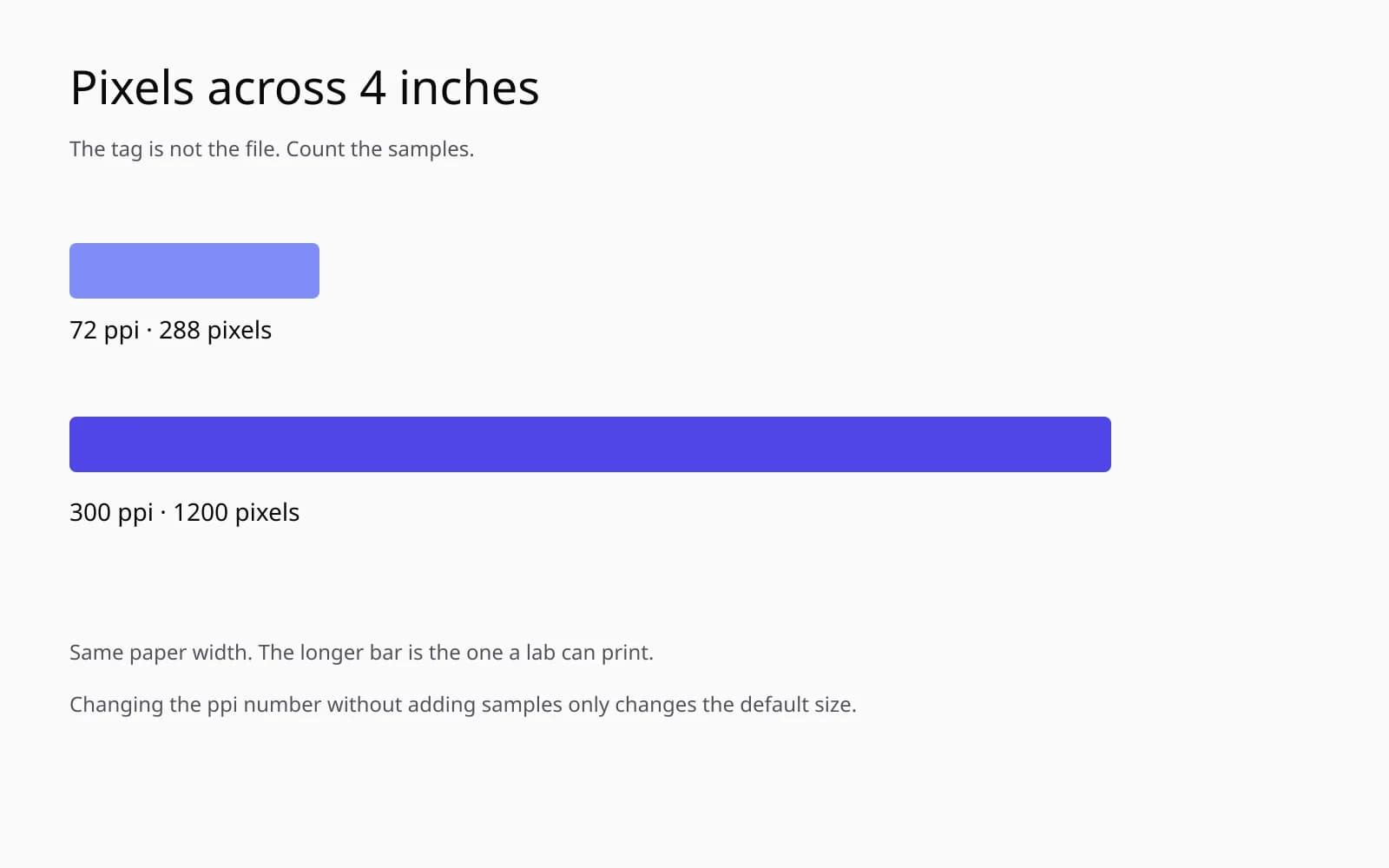
That generated sample is the card I use when I teach the difference between a sharp grid and a measurement of the wrong grid. The bars are separate. The smile is a few clean marks. It is not a client's doorway. It is a reminder that "clear on screen" is not a pixel count. You still have to read the count from the file you will send.
A table of numbers I have misread
Each row is a real confusion from a job, with the number I should have written down.
| What I saw | The tempting reading | The resolution of the file I meant |
|---|---|---|
| 3.1 MB on doorway.jpg | "about 3 megapixels" | 4032 by 3024, 12.2 megapixels |
| Tag 72 ppi | "a 72-resolution photo" | same 4032 by 3024, tag is a default |
| Library preview, long side 2048 | "the doorway is 2048" | original in the library was 4032 by 3024 |
| Screenshot of a browser preview | 1600 wide | the photo file was 6000 by 4000 |
| Stored 4032 by 3024, displays vertical | order a wide print | displayed grid 3024 by 4032 |
| Chat save, long side 1280 | "they only had a small camera" | camera file still 4032 by 3024 |
The last row is the messenger problem, and it is the one that makes people ask for an upscaler before they have asked for the original. A 1280-pixel file has a resolution of 1280 on the long side. That sentence is true and incomplete. The camera roll may still hold the 4032. I tell the resolution of the file in my hand, and I ask whether it is the only generation. If a second generation exists, it has its own resolution, and it is usually the one to print. The AI image upscaler is for the case where the small generation is the only one. It is not for a 1280-pixel export that has a 4032-pixel sibling sitting in a library under a different name.
What I do with the number once I have it
Reading 4032 by 3024 does not tell me the picture is sharp. It tells me the grid. Focus, motion, noise, and a heavy JPEG are all free to ruin a large grid. I say that in the same breath as the number, because "12 megapixels" has been used on me as a synonym for "good." A 12-megapixel blur is a large blur.
For a print, I divide after we pick inches. A 300 ppi 8-inch side wants 2400 pixels. The doorway's long side, 4032, can cover more than 8 inches at 300 ppi without inventing anything. 4032 divided by 300 is 13.4 inches. The short side, 3024 divided by 300, is 10.1 inches. So a 10 by 13 print is in range, and an 8 by 10 is a crop, not an upscale. If someone asks me to "fix the resolution" of this file for an 8 by 10, I tell them there is nothing to fix. I crop, I set a tag if a portal is superstitious, and I leave the samples alone.
If the file in hand is the 1280-pixel chat save and the original is gone, then the division fails for a large print and the conversation becomes an enlargement conversation. That is the enhance photo quality tool, and it starts only after the filename on the sheet matches the only file that exists. Enhancing the 1280 while the 4032 is in a folder I did not open is the expensive way to avoid reading a panel.
A classroom-style explanation of what the word resolution is doing in a newspaper versus a camera sits in what is resolution in pictures. The customer-facing version, which starts from a file someone brought to a counter, is what is a picture's resolution. This page is the reading skill those two assume.
Checks, so the panel cannot hustle me
I keep these next to the keyboard. They are short because the failures were fast.
- Read the filename out loud and write it beside the pixel pair.
- Find the word pixels. Do not stop on megabytes, ppi, inches, or a zoom percentage.
- If a library shows more than one version, read the pixels on the version you will export, then read them again on the exported file.
- In a browser, prefer natural size over displayed size. If you cannot find it, save the file and measure the save, and name the save as a save.
- Check orientation. Stored width and displayed width may swap. Order the print from the displayed pair.
- Do not measure a screenshot of a picture and call it the picture.
- Ask if a larger generation exists before you call a small file the resolution of the day.
The zoom percentage is the one I still fall for on a laptop. A view at 100 percent means one screen pixel per file pixel only when the display is not scaling. On a high-density screen, "100 percent" can mean two device pixels per file pixel, or it can mean a fit. I stopped using the sharpness at 100 percent as a resolution test. Sharpness is focus. The pixel pair is the resolution. They meet when you print, not when you glance.
A small file, read correctly, on purpose
Someone brought a scan of a print, and the panel said 900 by 600. They were apologetic, as if they had failed a test. 900 by 600 is the resolution. It is a small grid. At 150 ppi it prints 6 by 4 inches. At 300 ppi it prints 3 by 2 inches. Both prints are honest. Neither print requires me to pretend the file is 4032 wide. I wrote scan-back-001.jpg 900 by 600 and I offered the 6 by 4. They had been told by a form that "resolution must be 300 dpi," and they had multiplied 300 by 8 and concluded their file was illegal. The form assumed an 8-inch side. Their side was going to be 6. The law they were enforcing was a different job's law.
That is how I tell image resolution when the room is full of numbers. I pick the pixel pair that belongs to the file I will actually send. I write the name. I divide only after the inches are chosen. I leave every other figure, the tag, the megabytes, the zoom, the window, the friendly preview, on the side of the sheet where the warnings go. The doorway was 6000 by 4000 the whole time I thought it was 1600. The file had not changed. My eye had been on a picture of the file, and a picture of a file has a resolution of its own.
Questions that come up after the file is open
Which number is the resolution, the pixel size or the ppi?
The pixel width and height are the resolution of the file. The ppi tag is a label about how those pixels might be spaced on paper. A 4032 by 3024 file tagged 72 ppi is still a large file.
Why do two apps show different sizes for the same picture?
One is showing the file's pixels and another is showing the size it is drawn at, or a preview. Match the filename, then read the pixel dimensions, not the zoom and not the megabytes.
A screenshot says the photo is 1600 pixels wide. Is it?
The screenshot is 1600. The photo inside it may be much larger. Open the photo file itself. Measuring a window is how I once reported the wrong picture.
Does a vertical photo have its width and height swapped in the file?
Often the stored pixels are horizontal and a rotation flag tells the viewer to turn them. Read the displayed orientation and the stored numbers, and do not order a print from the stored pair alone.