Repair · August 2, 2026
How to digitise photographs from a shoebox
A shoebox workflow for how to digitise photographs: dust, 600 ppi on a 4x6, file names, and why a phone shot of the print is a different job.
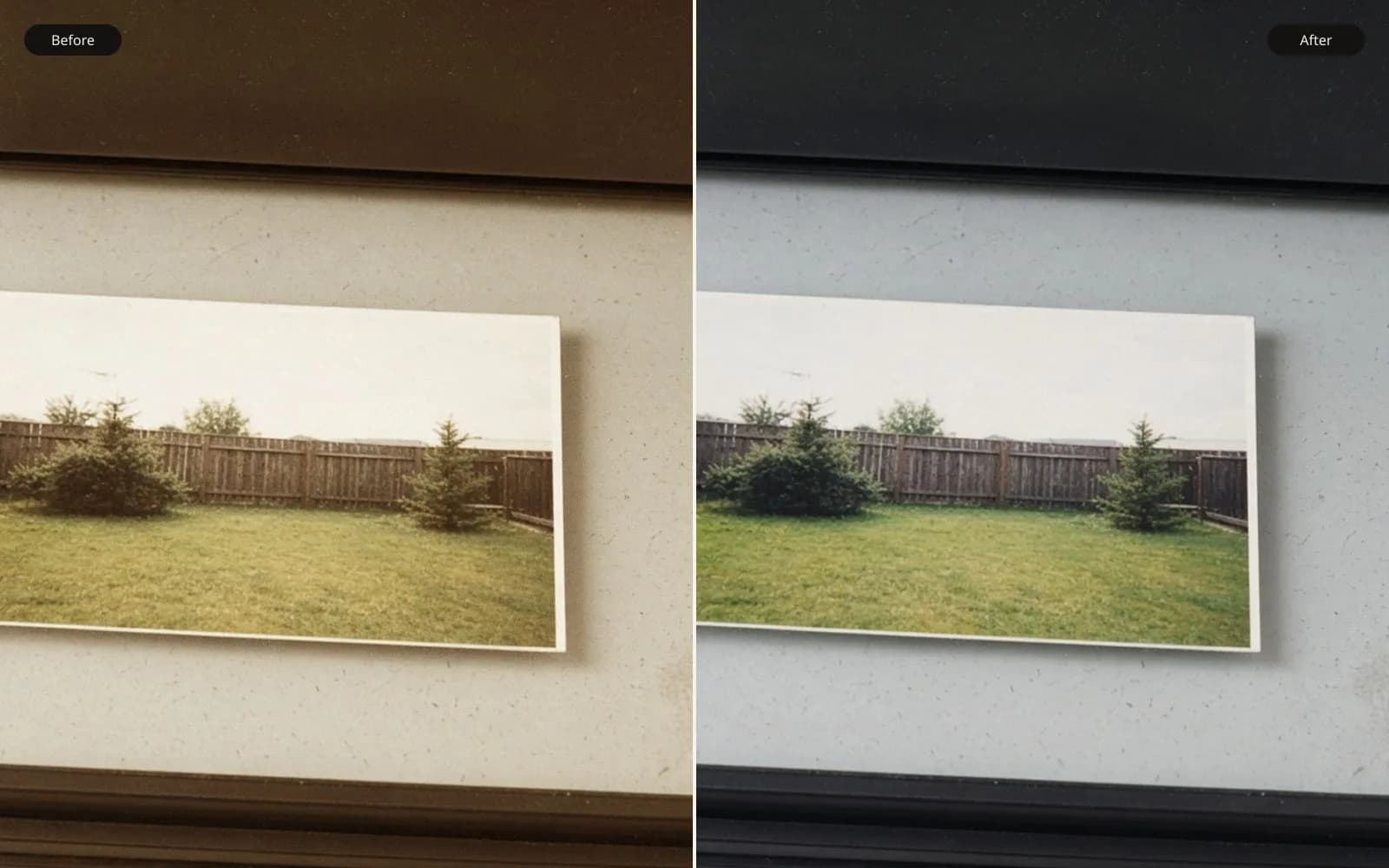
A shoebox scan still has dust even when the pixels are enough. Restore the scanned photo after the glass is clean, not before.
People ask me how to digitise photographs after a relative dies or moves, and the object in front of them is a shoebox, not a camera setting. I had one of those boxes in August. It was a brown cardboard shoe box from a cupboard in a terrace in Leeds, the lid split along one crease, with "M. Pell, prints, unsorted" written on the side in ballpoint. The job was to make files that could be reprinted, not to make the pictures look new.
TL;DR. I digitise prints on a flatbed, after I have blown dust off the glass and the print. A 4 by 6 inch print at 600 ppi becomes a 3600 by 2400 master, about 52 megabytes as a 16-bit TIFF, and that is the file I keep. Photographing the same print with a phone is a different job: the phone records glare, keystone, and an uneven number of pixels per inch of paper. I name files with a date and a subject, leave the scanner's restore and sharpen options off, and only later send a dull or grainy master to a repair. The phone frames stay in a notes folder so they never get mixed up with the scans.
What was actually in the box
I tipped the box onto a clean table and sorted before I powered the scanner. Counting first saves a mess of half-named files. I had 86 pieces, not all of them the same kind of object.
Most were 4 by 6 inch lab prints, glossy, from the late 1970s and early 1980s. A smaller stack were 3.5 by 5 inch prints, the older lab size. One 8 by 10 of a wedding was still stuck to a gray mount board. Four integral instant prints, the square kind with a fat chemical border, sat in a paper sleeve. A glassine sleeve held four frames of color negative, 35mm, uncut as a short strip. Nothing in the box was a born-digital file. That sounds obvious, and it changed the work, because I was sampling paper and film, not copying a disk.
I wrote a paper list with a pencil before any file existed. Eight lines mattered more than the other seventy-eight, because those eight were the ones a cousin had asked for. The rest could wait for a second afternoon. The eight were:
- A 4 by 6 of a back garden, pencil on the reverse, "Aug 79, M. at the beans."
- A 4 by 6 of a kitchen with no date, a green cast from fluorescent tubes.
- A 3.5 by 5 school portrait, 1974 written on the mount, soft even as a print, clearly a copy of a copy.
- A 4 by 6 Christmas flash picture, lab stamp on the back reading a date in December 1982.
- The mounted 8 by 10 wedding, 1971, which I did not peel off the board.
- A 4 by 6 beach print, faded toward magenta, lab stamp 1976.
- An instant print of a dog on a step, chemical stain along the bottom edge.
- The negative strip, which I set aside because a reflective scan is the wrong tool for it.
The other prints went back into the box in the order I had found them, with a paper slip marking where I stopped. I have lost afternoons to "while I am here I will do the whole box," and the names get sloppy after the first hour.
The phone photo I should not have trusted
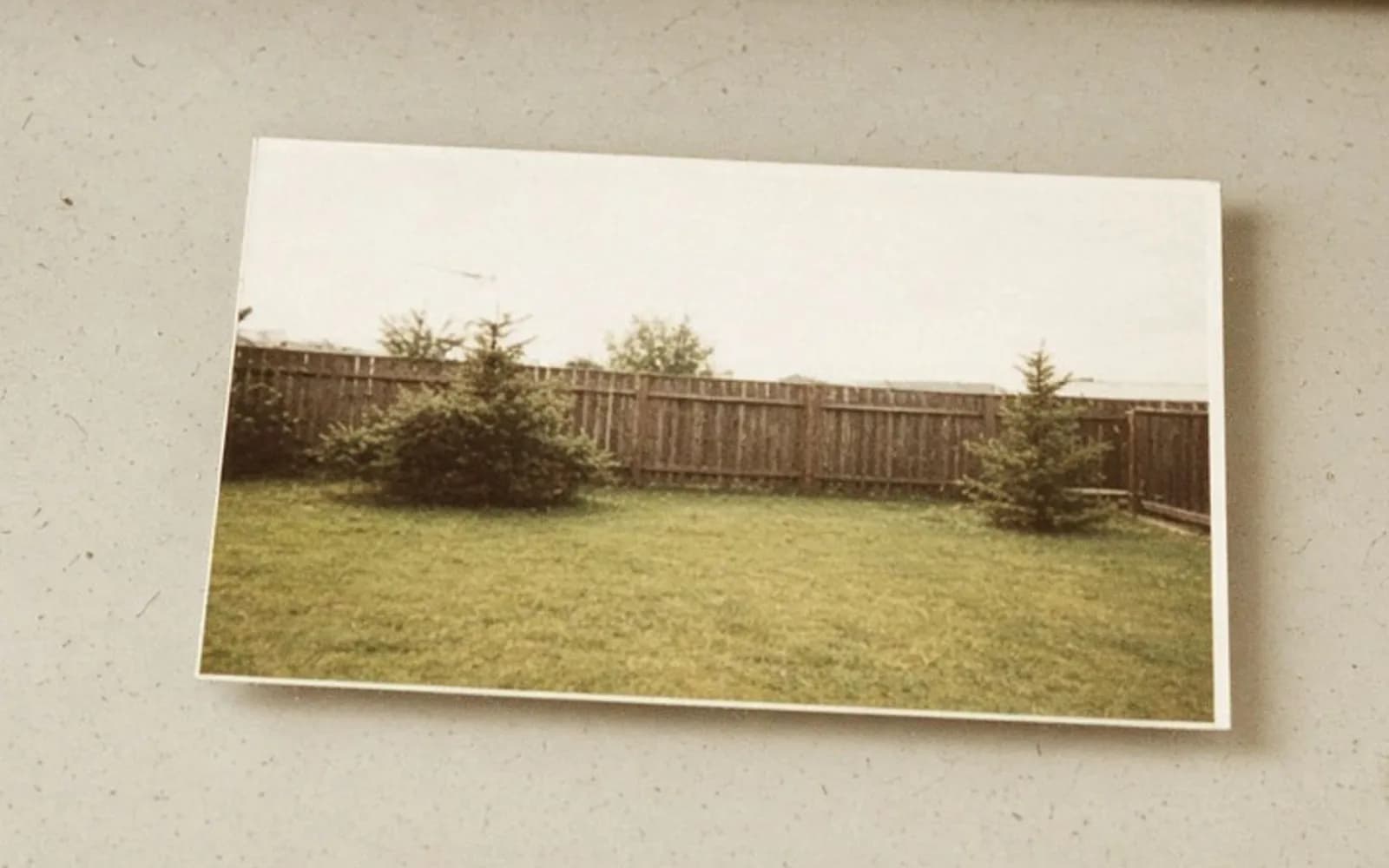
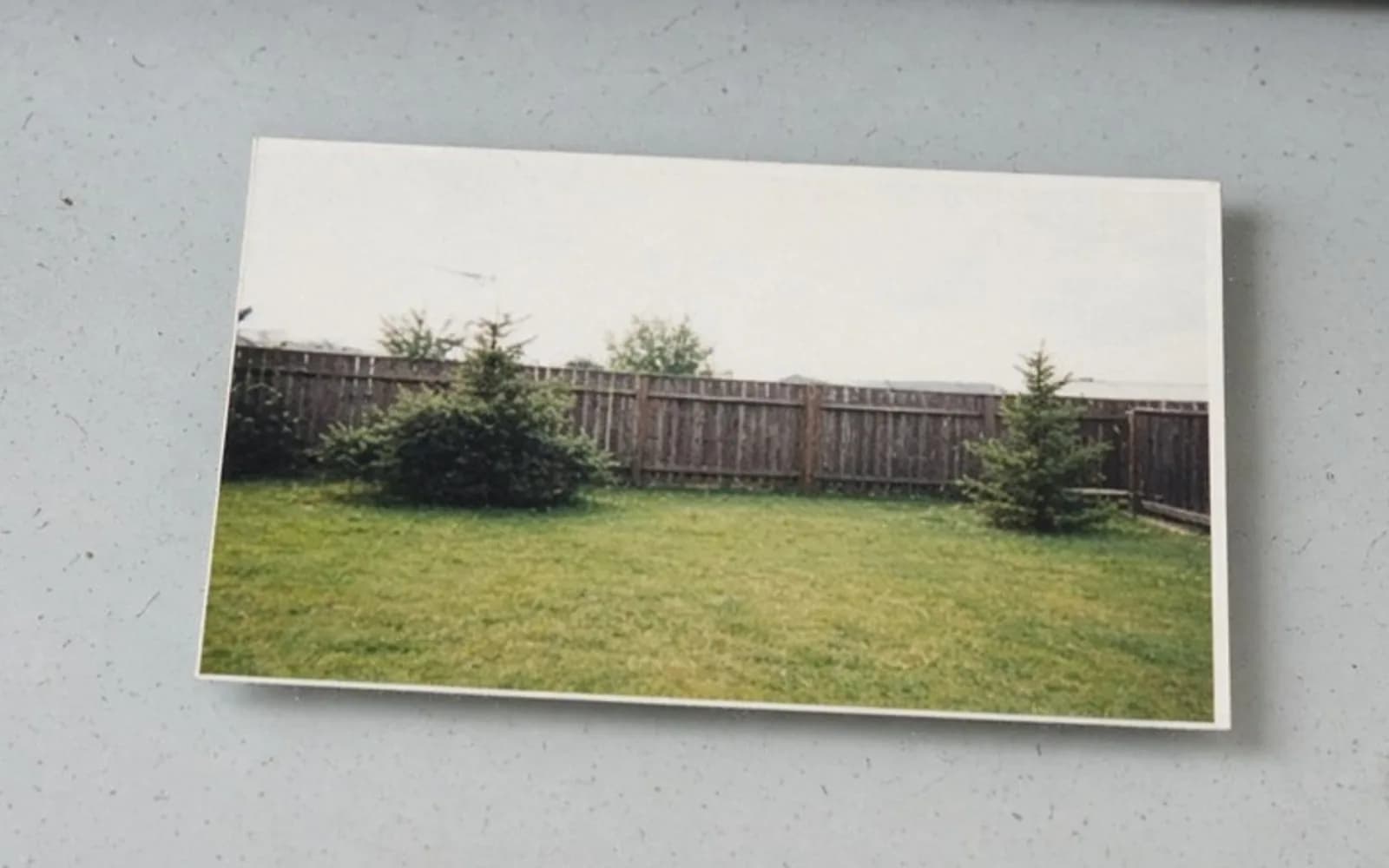
Before I carried the box to the scanner I tried the shortcut everyone tries. I laid the garden print on the table by a window and photographed it with a phone. The file was IMG_20260802_101644.jpg, 4080 by 3072, 3.6 megabytes. It looked plausible in the camera roll at thumbnail size. It was not a digitised photograph. It was a photograph of a rectangle of paper.
I opened it at 100 percent on a laptop and marked the problems in the order I noticed them.
The print did not fill the frame. After I cropped away the table, the paper occupied about 2100 by 1450 pixels, and those pixels were not a rectangle. The top edge of the print, farther from the phone, was shorter than the bottom edge. That is keystone. A later perspective crop can square the outline. It cannot give the far edge the samples the near edge got. I measured roughly: the near edge of the paper was sampled at about 220 pixels per inch, and the far edge at about 160. A flatbed does not do that. Every inch of the print gets the same pitch.
A window was in the gloss. The upper third of the sky in the garden was a white blob, clipped, with no leaf detail under it. On the paper, in the room, I could still see the leaves by tilting the print. The phone had recorded the reflection, and the reflection had replaced the picture. Moving my body helped a little. Killing the reflection meant killing the window light, which is why the flatbed exists.
The phone lens added its own softness at the corners of the frame, and the print's corners landed in that zone. The beans, which were the subject of the pencil note, sat near a corner of the print and came out mushy. The center of the phone frame, which was mostly empty path, looked sharper than the subject. That is a bad trade, and no later repair knows that the beans mattered.
Paper texture and a small crease near the bottom became image detail. At thumbnail size you do not see it. At a reprint size you do, because the crease casts a shadow that was never in the garden. A flatbed lamp is straight on and the crease almost disappears. It does not vanish if the emulsion is cracked. It does vanish as a shadow.
I saved a squared-up crop as notes/phone-of-print-garden.jpg, 2000 by 1400, 1.4 megabytes, and put it in a notes folder. I did not put it next to the scans. The notes folder is allowed to be wrong. The masters folder is not.
Dust, the glass, and one dirty scan I kept
I use a flatbed that has lived in the same spot for years. The glass is never as clean as I remember. How to digitise photographs badly, in one step, is to scan first and blow the dust off later. The dust is then inside the master.
My sequence on that Saturday was short. Lid up. Blower on the glass, then a dry microfiber cloth, then the blower again because the cloth sheds. Blower on the print, held at the edges, emulsion side up, never a wet cloth on a glossy lab print. I have lifted dye doing that, once, on a beach print from the same era as this box, and the tide line of the damage was worse than the dust.
I placed the garden print, closed the lid, and scanned. Then I did a second scan on purpose without cleaning, of the kitchen print, so I would have a record of what the dirt looked like. That file is 1970s-kitchen-fluorescent-dusty.tif. A hair on the glass is a dark curve, sharp, about one pixel wide at 600 ppi and several hundred pixels long. A speck on the print is slightly softer if the paper is not perfectly flat. A speck on the glass is sharper than the grain of the paper, because the glass is in the plane of focus and a buckled print is a little off it. I use that to decide what I may clone later. Glass dust is not part of the photograph. Paper grain is.
Consumer scan software offered me dust removal, color restore, and unsharp mask as checkboxes. I turned all three off. On a reflective print, the dust tool is a retouch. It guesses. On glossy highlights, the last time I left it on, it punched small dark holes where the shine had been, and I did not notice until I had deleted the raw scan. Infrared dust removal of the kind that works on color film does not apply here. There is no film base and no infrared channel in a print scan. If a driver still shows the checkbox, it is doing something else, and I do not want it in the master.
The wedding 8 by 10 stayed on its mount. Forcing it flat would have cracked the emulsion at the curl. I scanned it under the lid with a light hand, accepted a millimeter of softness at one corner where the mount lifted, and wrote that in the note file. A perfect number on a damaged object is a lie.
Why 600 ppi on a 4 by 6 is its own job
Ppi is pixels per inch of the object on the glass. It is not a quality slogan. A 4 by 6 at 600 ppi is 2400 by 3600 pixels if you measure the short side first, or 3600 by 2400 if the print is horizontal. I set the scanner to 600 and to inches, then I check the pixel dimensions in the file before I scan the next print. If a "4 by 6" comes back as 1200 by 1800, the driver silently scanned at 300 and I do not have the file I think I have.
Here is the arithmetic I actually use. Print width in inches times ppi equals pixels on that side. A 4 by 6 at 300 ppi is 1200 by 1800. A 4 by 6 at 600 ppi is 2400 by 3600. A 3.5 by 5 at 600 ppi is 2100 by 3000. An 8 by 10 at 600 ppi is 4800 by 6000. The instant prints were about 3.1 by 3.1 inches inside the chemical border. At 600 ppi that inner square is about 1860 by 1860, and I scan the border too, because the border is how you know it was an instant print.
A 16-bit RGB TIFF with no compression stores six bytes per pixel. For the garden print that is 3600 times 2400 times 6, which is 51,840,000 bytes, about 52 megabytes. I watched the file size after the first scan. If it had landed near 17 megabytes I would have known I had saved 8-bit by mistake. An 8-bit TIFF of the same pixel count is about 26 megabytes. A JPEG at quality 90 of that garden, with leaves and a textured path, came out at 4.6 megabytes. The JPEG is what I can email. It is not what I can return to in ten years without another loss.
300 ppi is not useless. It is a screen file. 1800 by 1200 will fill a laptop. It will not survive a crop of a face. The school portrait was already soft, and the child's face on the 3.5 by 5 was only about an inch tall on the paper. At 300 ppi that face is roughly 300 pixels tall. At 600 ppi it is roughly 600. Neither number invents the eyelashes the copy-of-a-copy never had. The higher number at least does not throw away more of the soft detail that is there. I still scanned it at 600. I did not expect a miracle. I expected a faithful copy.
Photographing the print at 4080 by 3072 did not beat the 600 ppi scan, even though 4080 is a bigger number than 3600. The phone's pixels were spent on the table, the keystone, and the glare. The scan's pixels were spent on the print. Comparing the two by the long-edge number is how the phone file wins an argument it should lose.
| Object | Pitch | Pixel size | Master I kept | Approx size |
|---|---|---|---|---|
| Garden 4 by 6 | 600 ppi | 3600 by 2400 | 1979-08-back-garden.tif | 52 MB |
| Garden, screen copy | 300 ppi | 1800 by 1200 | 1979-08-back-garden-300.tif | 13 MB |
| Kitchen 4 by 6 | 600 ppi | 3600 by 2400 | 1970s-kitchen-fluorescent.tif | 52 MB |
| School 3.5 by 5 | 600 ppi | 3000 by 2100 | 1974-school-portrait.tif | 38 MB |
| Wedding 8 by 10 | 400 ppi | 4000 by 3200 | 1971-wedding-mounted.tif | 77 MB |
| Beach 4 by 6 | 600 ppi | 3600 by 2400 | 1976-beach-magenta.tif | 52 MB |
| Phone photo of garden print | uneven | 4080 by 3072 | notes/IMG_20260802_101644.jpg | 3.6 MB |
The wedding is the odd row. At 600 ppi an 8 by 10 would have been 4800 by 6000 and about 170 megabytes. The print was already soft, it was mounted, and the cousin wanted a 5 by 7 reprint, not a wall mural. I scanned that one at 400 ppi, checked I had 3200 by 4000 pixels, and wrote the reason in 1971-wedding-mounted.txt. Lowering the pitch was a decision about the object, not a default. The 4 by 6 prints stayed at 600.
A name that survives a second box
In 2019 I scanned another family's box as scan001.jpg through scan086.jpg. The garden equivalent was scan041.jpg. I could not find it again without opening every file. That is the failure this naming is built to avoid.
When the back of the print has a year and a month I believe, the master is YYYY-MM_subject_size_ppi.tif. The garden is 1979-08-back-garden.tif. When I only have a decade, I say so: 1970s-kitchen-fluorescent.tif. When I have nothing, the box and the envelope win: box1-envC-017_woman-in-hat_4x6_600.tif. I do not trust myself to remember envelope C next month.
Each master has a sidecar text file when the back has writing. I transcribe the pencil into the text file, and if the date is easy to misread I scan the back at 150 ppi as 1979-08-back-garden-back.jpg, usually under a megabyte. I do not scan every blank back. I do scan stamps, pencil, and ink.
The folder layout from that Saturday is small and I have not regretted it:
pell-box-2026-08/tiff/holds masters only. No phone frames, no experiments.pell-box-2026-08/jpeg/holds quality-90 JPEGs exported from the TIFFs, same base name.pell-box-2026-08/backs/holds the low-resolution scans of writing.pell-box-2026-08/notes/holds the phone pictures and my paper list, typed.pell-box-2026-08/experiments/is the only place a repair is allowed to land.
If a tool offers to "replace the original," it does not get pointed at tiff/. I copy a JPEG into experiments/ and let the tool ruin that. The TIFF's modification time should stay on the Saturday I scanned it.
Bit depth, casts, and the file I refuse to pretty up
The kitchen print was green. The beach print was magenta. Both casts are in the paper. A scanner driver can apply a correction and save only the corrected JPEG, and then the cast is gone along with anything the correction clipped. I saved 16-bit linear-enough scans, the driver's color management set to embed a profile and not to "auto restore."
I am not romantic about flat files. The kitchen looks unpleasant if you open it and do nothing. That unpleasantness is the record. A later curve, in an editor, on a copy, can pull the fluorescent cast back. The copy goes to experiments/ or to jpeg/ with a suffix, _neutral.jpg. The master stays green. I have had to return to a master when a "neutral" export made a white shirt gray and a face the same gray. The green file still had the difference between the shirt and the face.
The beach magenta is fade, not white balance. Blue dye in a lot of late-1970s paper goes first, and the print drifts red. A white-balance eyedropper on the sand will not bring the sea back, because the sea's blue is what faded. I scanned it faithfully, wrote "magenta fade, do not treat as a color cast" in the sidecar, and stopped. Restoration is a second job. Mixing it into the scan is how you end up with one file and no record of the paper.
The school portrait was soft and contrasty, the way copy prints get when a lab reprints a reprint. I did not add scan sharpening to "help." Sharpening at scan time outlines the softness and the halftone-like grain of the paper, and any later repair treats those outlines as edges. The same reason shows up when people sharpen a pixelated file before they restore it. Order matters, and the first order is: record, then decide.
The instant print had a chemical stain, a pale brown tide at the bottom, inside the image area. I included it. Cropping to a clean square would have been a quiet edit. The dog's paws were near the stain. I would rather crop at print time, on a copy, than discover next year that the paws were in the part I called border.
The negative strip did not go on the flatbed as a reflective scan. If I lay negatives on the glass and close the lid, I get orange rectangles with a backwards, flat image and no proper film mask. Digitising those four frames means a film holder and a transmissive scan, or a camera copy stand aimed at a light box, with the film held flat. I did not pretend the print workflow covered it. The sleeve went into a zip bag labeled pell-negs-4f, undigitised, with a line in the notes. An honest gap is better than an orange JPEG nobody can print.
What I do after the master exists
Only after the TIFF was in tiff/ and the JPEG was exported did I look at repairs. Two of the eight needed something beyond storage.
The garden is grainy in the sky, which on a 1979 lab print is the paper and the enlargement from a small negative, plus a little dust I had missed between leaves. I did not blur that away inside the scanner. Grain that is actually grain should stay in the master. A delivery copy can be quieter. I sent a JPEG duplicate through the grain repair path and wrote the result to experiments/1979-08-back-garden-grain.jpg. The sky calmed down. The beans did not grow extra leaves. I kept that experiment and did not replace the TIFF. Speckle is not the same job as a torn print. How to restore old pictures is where I deal with loss and damage. The grain page is only for the speckle.
The beach fade and the soft school portrait are not scan problems. They are damaged or exhausted pictures. Making them larger does not make them clearer. How to enlarge old photos is the note I follow when a cousin asks for a bigger print than the scan's real detail supports. Sometimes the honest answer is a 5 by 7 of a 600 ppi file, not a 16 by 20. How to repair old photos is the separate case: cracks, tears, missing corners. I had one torn 4 by 6 still in the unsorted pile, a diagonal crease through a coat. I did not scan it on Saturday. A tear wants a decision about whether to heal it. I was still making masters.
For the garden JPEG I was willing to let a mild pass tidy the dullness without repainting the face. That is the enhance end of the work, and I judge it on the beans and on the woman's mouth, not on whether the file feels modern. A punchier file that moves the mouth is a different person in a different garden. The TIFF still has the mouth where the paper had it.
Checks I run before I call the box done
I do not trust the afternoon. I check a sample of files the next morning, when I am bored enough to be strict.
I open the TIFF and the JPEG side by side. The pixel dimensions must match. I have exported the wrong derivative before, a 300 ppi JPEG wearing a 600 ppi name, and the name is then a lie that survives for years. The garden pair both read 3600 by 2400.
I look at the file size. A 52 megabyte TIFF that became 8 megabytes has been resaved as something else. I reject that folder until I know which save dialog did it.
I zoom to 100 percent on an empty sky and on a high-contrast edge, such as a window frame in the kitchen. The sky should show grain or smooth dye, not a grid, not a moire from a halftone. One print in the unsorted pile was a magazine page someone had trimmed to photo size. I caught it on this check, later, because the blue of a uniform turned into a regular dot. That one is not a photograph to digitise with a photo workflow. It is a printed page. I moved it out of tiff/ into notes/not-a-photo/.
I read three sidecar files out loud. If I cannot tell which print they describe, the name is too clever. 1979-08-back-garden.txt says "pencil: Aug 79, M. at the beans. Glossy 4 by 6. Scanned 600 ppi, 16-bit, no driver sharpen, dust blown, small crease at the bottom left, kept." That is enough.
I confirm the phone files are only under notes/. A search for IMG_ inside tiff/ should return nothing. On Sunday it returned nothing. That was the check I cared about most, because the phone file is the one a helpful relative will later call "the good one" on account of it looking brighter in a chat app. It is brighter because the glare clipped the sky to white. Bright is not digitised.
What I sent, and what I refused to send
The cousin wanted the garden and the wedding. I sent two JPEGs, the garden at 3600 by 2400 and the wedding at 3200 by 4000, in an ordinary folder, with the text notes pasted into the email so the pencil would not depend on my disk. I did not send the TIFFs through email. They are large, and a mail client that recompresses would have undone the point. The TIFFs stayed on the disk and on a second copy I wrote to a small drive labeled with the same folder name.
I refused to send the phone photo as if it were the scan. I also refused to send the kitchen "neutral" experiment as a master. It was a guess about the fluorescent tubes. The cousin can have it labeled as a guess. The green TIFF is the photograph we actually inherited.
I refused a 16 by 20 of the school portrait. At 600 ppi the file can be printed that big in the sense that the printer will not have to stretch pixels. The face cannot. Stretching a soft inch of 1974 paper across a poster prints the softness larger. The note on enlarging covers that refusal in more detail. My part on Saturday was only to make sure the refusal was about the picture, not about a scan I had botched.
The box is not finished. Seventy-eight prints are still unsorted, and four negative frames have no scan at all. I know that because the notes say so. That list is part of how to digitise photographs without lying to yourself about the size of the job. A finished-looking JPEG of the garden is not a finished box. It is one master, named, sized, and dull in the places the paper was dull, which is what I wanted from the afternoon.
Questions that come up after the file is open
Is a phone photo of a print the same as a scan?
No. The phone records the table, the glare, and the lens, and the print's own pixels are sampled unevenly, while a flatbed at a set ppi records the print. I keep the phone frame only as a note about what was in the box.
What resolution should I use for a 4 by 6 inch print?
I use 600 ppi when I might reprint or crop, which is 3600 by 2400 pixels. At 300 ppi I get 1800 by 1200, which is fine on a screen and tight if I crop a face. I do not let the scanner sharpen or restore color while it scans.
Should I clean the print before I scan?
I blow the glass and the print first. A wet wipe on an old glossy print can lift the surface. Dust I leave on the glass becomes a sharp mark in every later copy, so I would rather spend the minute.
Do I keep the TIFF or the JPEG?
I keep the 16-bit TIFF as the master and a JPEG as the copy I send. For a 4 by 6 at 600 ppi the TIFF is about 52 megabytes. I never edit the JPEG and then throw the TIFF away.