Clarity · June 28, 2026
How to sharpen an image after the repair, not before
How to sharpen an image once an unsharp mask has already drawn a white halo on a bottle.
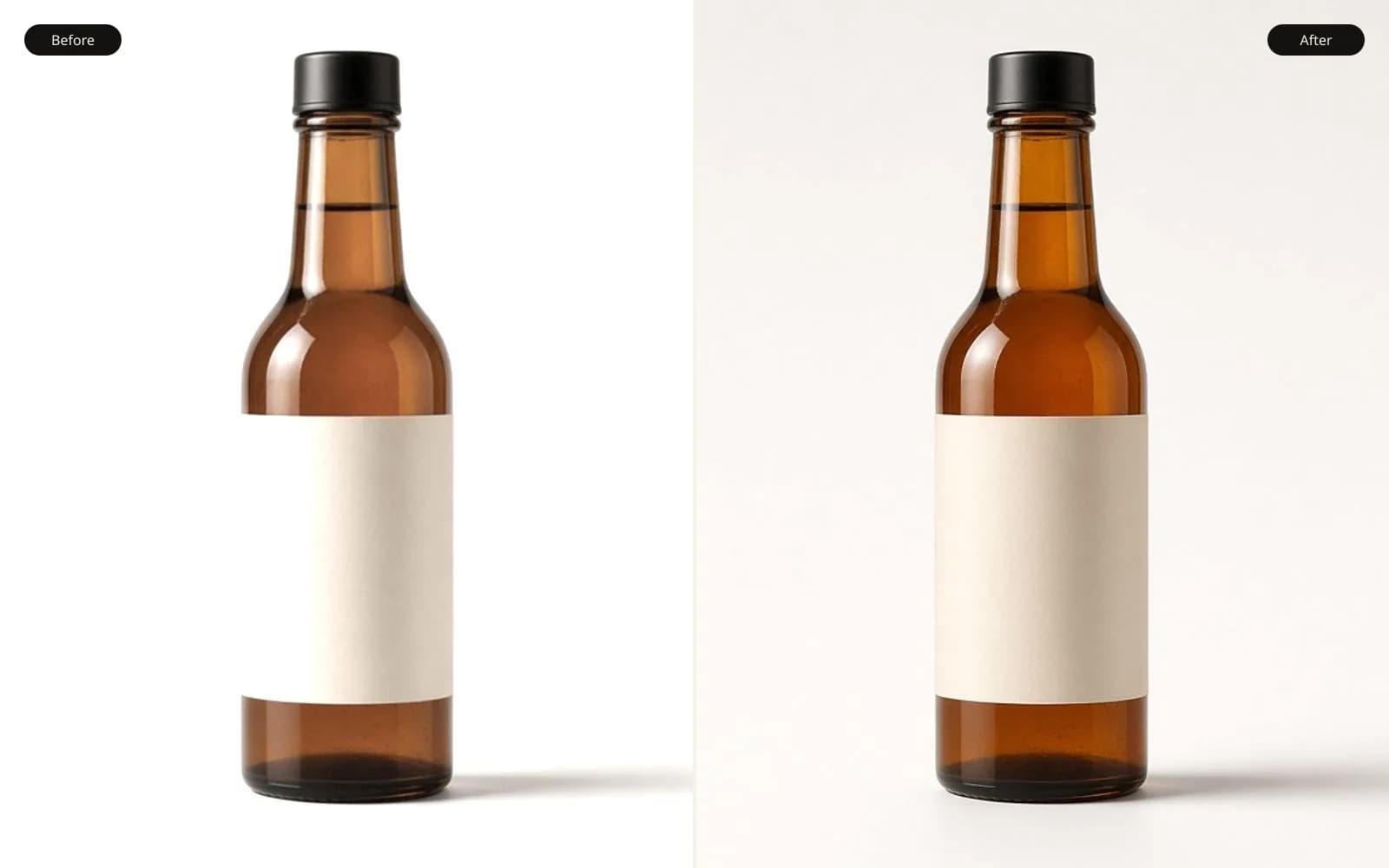
Sharpening after a repair piles a halo on a guess. Unblur the image once, then stop.
My brother bottles a hot sauce on Sundays and photographs the bottle on a white board. He asked how to sharpen an image and sent the JPEG he was about to email to a label shop. The bottle looks crisp until you hit 100 percent. A white halo sits outside the glass, about 3 pixels wide, and a dark twin sits inside the edge. He had already run an unsharp mask. The shop would have printed the halo as a gray outline on the sell sheet, and he would have blamed the printer.
The file is 1800 by 2400 pixels, 2.4 MB. In the editor history, which he had not cleared, the unsharp step reads amount 180, radius 2.8 pixels, threshold 0. Threshold zero means the mask sharpens every difference, including the quiet step between a bright shoulder and a white board. Radius 2.8 is wider than the real edge, which in the pre-sharpen file is about 1 pixel of transition. The mask does what it always does when the radius overshoots: it lightens the outside and darkens the inside, and the eye reads a glow.
I asked if the card still had the frame. It did. Camera JPEG and a RAW, both 6000 by 4000. The camera JPEG had in-camera sharpening at a modest setting. The RAW had none until a conversion. I converted the RAW with sharpening set to zero, exported a 1800 by 2400 to match his crop, and put his halo file in a folder named do-not-print. How to sharpen an image starts by finding a version that has not been sharpened yet.
TL;DR. The bottle file already carried an unsharp mask at radius 2.8, amount 180, threshold 0, and that pass drew a white halo about 3 pixels outside the glass. Sharpening it again brightens the halo. I converted the RAW with sharpening off, removed dust and a sauce drip, then applied a small radius only where the glass needed it. Label text was already crisp and I left it alone. The cap was slightly out of focus, so it got a mild deblur instead of a harder mask. The sell sheet received the repaired file, not the glowing one.
What the halo is, in numbers I can point at
I sampled the white board away from the bottle: a patch that sits around 244, 244, 244 on a 0 to 255 scale. Just outside the glass, in the halo, the same sample reads about 252 to 255, a lift of roughly 8 to 11 points, and in the brightest stretch near the shoulder the lift is closer to 18. Inside the glass, a dark band about 2 pixels wide drops the edge by a similar amount relative to the sauce color next to it. The pair, light outside and dark inside, is the classic unsharp signature. It is not a reflection. Reflections on this bottle are soft vertical windows from the room, and they sit inside the glass, not as a uniform ring.
The ring follows the contour, including the curve of the shoulder and the straight side. A real highlight would break where the glass turns away from the lamp. This ring does not break. It is equally polite all the way around, which is how I know a filter made it. I showed him the sample numbers. He had been sure the board was "just hot." The board is hot, and the ring is hotter still, in a shape that matches the bottle exactly.
At the base, the halo merges with a faint contact shadow he had lightened. The mask treated the remaining shadow as an edge and outlined it too, so the bottle appears to float. Floating product shots are a style. This one was an accident, and the float has a white seam. I would rather have a soft contact shadow than a seam. On the RAW conversion I kept a shadow about 12 points darker than the board, feathered over about 20 pixels. No outline.
JPEG compression in the 2.4 MB file is gentle. The halo is not a block artifact. Blocks would be 8 pixels and grid-shaped. This is a contour. Blaming the JPEG would have sent me into a denoise that the file did not need, and denoise plus another sharpen is how labels turn to wax.
Why the order is repair, then sharpen
His sequence had been: crop, unsharp, clone a dust spot, unsharp again because the clone looked soft, then a contrast bump. Each unsharp caught the previous halo and the clone edge. The dust spot is gone and in its place is a smear with a bright rim. I can see the rim at 200 percent, a circle about 40 pixels across on the 1800 file. Cloning after sharpening sharpens the clone. I wanted the clone on a quiet file.
On the RAW conversion I did the repairs first. Three dust specks on the board, black, easy, sampled from nearby white. One dried drip of sauce on the shoulder, real, about 15 pixels, which he wanted gone for the sell sheet and kept for the website honesty shot. I made both versions from the same conversion so the drip removal did not inherit a halo. A small color correction followed: the sauce had gone a bit orange under his contrast bump, and the RAW was closer to the jar I tasted, a red with a brown edge. I matched a spoon of the sauce on a white photo, shot in the same light, rather than pushing saturation until the bottle looked like a toy.
Only then did I sharpen. Radius 0.6 pixels, amount 35, threshold 3, on a layer limited to the glass contour and the cap threads. Threshold 3 keeps the quiet board from getting grainy. The board is almost featureless, and any sharpening there creates noise that prints as dirt. The glass edge, which was about 1 pixel of real transition, tightened without a ring. I checked the sample outside the glass again. It stayed within 2 points of the open board. That is the number I wanted.
Letters on the label are not glass
The label type was printed by a different shop last month, and in the RAW it is already crisp. A global unsharp at radius 2.8 had glowed the black letters, a pale fringe on the red stock, worst on the word "heat." I masked the label out of the sharpen layer entirely. If a letter had been soft because of focus, I would have handled that letter on its own, at a radius near the blur, and I would have stopped when the stroke got thinner. None of the letters were soft. They were victims of a mask aimed at the bottle.
The cap was the part that was actually soft
Focus sits on the label. The cap, a few centimeters farther from the camera, is soft by about 4 pixels on the thread grooves. Unsharp mask turned those grooves into double lines, a light and dark pair with no groove in the middle. That is the same failure as the halo, on a subject that was blurry rather than sharp. Outlining blur does not recover a thread.
I ran a mild pass from the unblur tool on a crop of the cap alone, then blended it at about half opacity. The grooves came back as grooves, three of them, which matches the cap in my hand. A stronger pass carved a fourth groove. The cap has three. I stopped at three. The blend lives only on the cap, feathered about 12 pixels where the cap meets the glass, so the neck does not get two different treatments.
The rest of the bottle did not need that pass. The label is in focus. Deblurring an in-focus label invents paper fiber that this paper does not have. I have a scrap of the label stock. The fiber is fine. The strong deblur made it look like canvas. Half the craft is refusing a tool on the region where the tool is bored and starts to decorate.
If the whole bottle had been soft, I would have started on enhance photo quality and judged the threads and the letter strokes together. This frame is mixed: sharp label, soft cap, and a halo from a filter. One slider cannot be right for all three. The halo file is the proof, because one slider was applied to all three and all three got worse in a different way.
A table of the versions
I printed this table on the job ticket so the label shop would not be mailed the largest JPEG by mistake. The halo file is the largest of the edits, and large is not the same as finished.
| Version | Size | Edge sample vs board | Use |
|---|---|---|---|
| Halo JPEG he sent | 1800 by 2400 | plus 8 to 18 points | Do not print |
| Camera JPEG | 6000 by 4000 | modest in-camera edge | Reference only |
| RAW conversion, no sharpen | 1800 by 2400 crop | within 2 points | Repair base |
| After dust and color | same | within 2 points | Website with drip, and sell-sheet base |
| Sharpen radius 0.6, masked | same | within 2 points | Sell sheet |
| Cap deblur, half opacity | cap crop only | threads show 3 grooves | Blended into the sell sheet |
| Unsharp again on the halo | test, deleted | plus about 25 points | Failure I kept as a screenshot |
The last row was a test I ran to show him the direction of the mistake. A second mask on the halo file pushed the ring to about 25 points above the board. The bottle looked "crisper" at thumbnail size and worse at 100 percent. Thumbnail size is how he had been judging. The shop judges closer.
What I check before I move the amount slider
The slider is the last object I touch. These are the conditions for touching it.
- Find a pre-sharpen file, RAW or a camera JPEG, and retire the haloed export.
- Repair dust, drips, and color on the quiet file.
- Sample the background just outside the product edge and write the number down.
- Set a threshold above zero when the background is a smooth board.
- Keep the radius at or under the real edge width. Here the edge was about 1 pixel, so 0.6 was safer than 2.8.
- Mask type and already-sharp print out of the mask.
- Send a different tool after actual focus blur, and limit it to that region.
- Compare a print strip, not a thumbnail, before the file goes to the shop.
He taped a copy of the list to the board he shoots on. The next bottle, a green sauce, came to me already in this order, and the only note I sent back was about a wrinkle in the backdrop. That is the outcome I want. Sharpening is a last pass with a number, not a rescue.
A drawing with one clean step, for the explanation
I am not publishing his label. When I need an edge that has no halo, I open a generated drawing: a round head, a teal body, a teal panel, a yellow circle, three tan bars, a small green shape, a brown floor. The step from the teal panel to the beige wall is a single change of color. There is no pale ring beside it.
I zoom him into that step and then I zoom him into his halo. The drawing does not look "more professional." It looks simpler. His glass should behave like that step: one transition, then sauce color, then board color. A ring means a filter got bored and drew a second edge. The drawing has no glass, no sauce, and no person. It is a prop so we can talk about edges without arguing about the recipe on the label.
If I blur the drawing and then unsharp it with a fat radius, I can manufacture a ring around the yellow circle. I did that once as a demo and I saved it under a name that cannot be confused with a product file. The demo ring convinced him faster than the sample numbers did. I still trust the numbers more. The demo is for the conversation. The 8 to 18 point lift is for the decision.
Print size on the sell sheet
The sheet is letter size. The bottle photo prints 4 by 6 inches. At 300 pixels per inch that is 1200 by 1800. His 1800 by 2400 crop, after we rebuild it clean, has surplus pixels. I scale down into the layout. Scaling down hides a little residual softness and does not hide a halo, because a 3 pixel ring at 1800 wide is still a visible line at 4 inches. I had him look at a proof at arm's length and at about 8 inches. At 8 inches the old halo is a gray seam. At arm's length he starts to excuse it. The shop's customer will pick the jar up. Eight inches is the right test.
We did not need a larger file than the crop. A 4 times upscale of a haloed bottle would have been a larger halo. Resolution was never the hole in this job. Edge contrast applied too early was the hole. I say that because he used the word resolution in the first text, and the word was a detour.
The website uses a 1200 pixel wide picture. I exported that from the same repaired master, with the drip left in, sharpening even lighter, amount 20, same radius and mask. Two exports, one master. The master is the RAW conversion at 16-bit in a working file, not either JPEG. If the shop asks for a tiny change to the shadow, I change the master and re-export. I do not sharpen the JPEG they rejected and send it back.
What I will not sharpen
I will not sharpen a file whose only problem is a halo from a previous sharpen. I will not sharpen label type that is already thinner than the press can hold. I will not sharpen a smooth white board. I will not use threshold zero on a product shot unless I want to spend the evening cleaning noise. I will not judge the amount at a thumbnail zoom.
I will sharpen, lightly, after repairs, on a mask, and I will re-sample the background. If the sample climbs, I lower the amount or the radius until it stops climbing. The finished sell-sheet edge stayed within 2 points. That is a dull result and it prints as a bottle, which is the assignment.
The green-sauce bottle the next week had a soft label because he focused on the cap by mistake. That one was a focus problem across the type. I did not reach for unsharp first. I used a restrained deblur on the label, checked the stroke widths against a physical label, and sharpened only a trace at the end. Different defect, different first tool. The list on the shooting board still applied: repairs, then the small mask, then the strip.
How the files are named so the shop is safe
He mails from a phone, so names matter more than folders he will never open. The print file is bottle-heat-sellsheet-4x6.jpg. The halo file is bottle-heat-HALO-do-not-print.jpg. The master is bottle-heat-master, a working file, kept on my side and copied to his drive. The cap-only experiment that grew a fourth groove is deleted except for one crop I kept to remember the failure, named four-grooves-wrong.jpg. If a name needs a warning, the warning is in the name, not in a message he will scroll past on market morning.
The shop replied with a one-line approval and a question about the shadow, which they found a little light. I darkened the contact shadow by 4 points on the master and re-exported. I did not touch the sharpen layer. A shadow change is not an excuse to revisit the amount. The second proof matched, and the sheet went to press at 4 by 6 inches of bottle with a red label and no gray seam.
Notes that sit beside this one
How to sharpen a blurry picture is the case where the whole subject is soft and someone still wants a mask. I send it when there is no RAW and no second frame. How to make photos more clear is the broader pass, when haze, glare, and focus are mixed and sharpening is only one candidate. How to increase clarity of a photo is local contrast, which would have made this white board noisy and would not have removed a halo. I did not use a clarity slider on the sauce. The glass was already separated from the board by a real edge.
How to sharpen an image, for this bottle, was a return to the unsharpened RAW, a short list of repairs, a radius under 1 pixel, a mask that spared the letters, and a different tool on the cap. The white ring was not a mystery of printing. It was radius 2.8 with the threshold left at zero, measured at 8 to 18 points above the board, and it never reached the shop.
Questions that come up after the file is open
Can I sharpen the halo away?
No. Another unsharp pass traces the white ring and makes it brighter. I go back to a file that never had the ring, then I repair, then I sharpen with a smaller radius.
What radius did the damage?
The radius was 2.8 pixels with the threshold at zero and the amount cranked. That radius is wider than the bottle's true edge, so the mask paints a light band outside the glass and a dark band inside.
Should the label text get the same sharpen as the glass?
Not in this file. The printed letters were already crisp, and a global pass put a glow on them. I sharpen the glass and the cap lightly, and I leave the type on the label alone.
Is a soft cap a sharpening problem?
The cap was a few pixels out of focus. Sharpening outlined the blur. A mild deblur on the cap, judged against the threads, did more than any amount slider.